AI-200 · 3.1.1 · Connect to and consume Azure services
Service Bus messaging
Queue and process back-end operations by using Azure Service Bus, including dead-letter queue handling, messages, topics, and subscriptions
Use queues for competing consumers, topics for fan-out through subscriptions, and for messages that cannot be completed.
Queue or topic
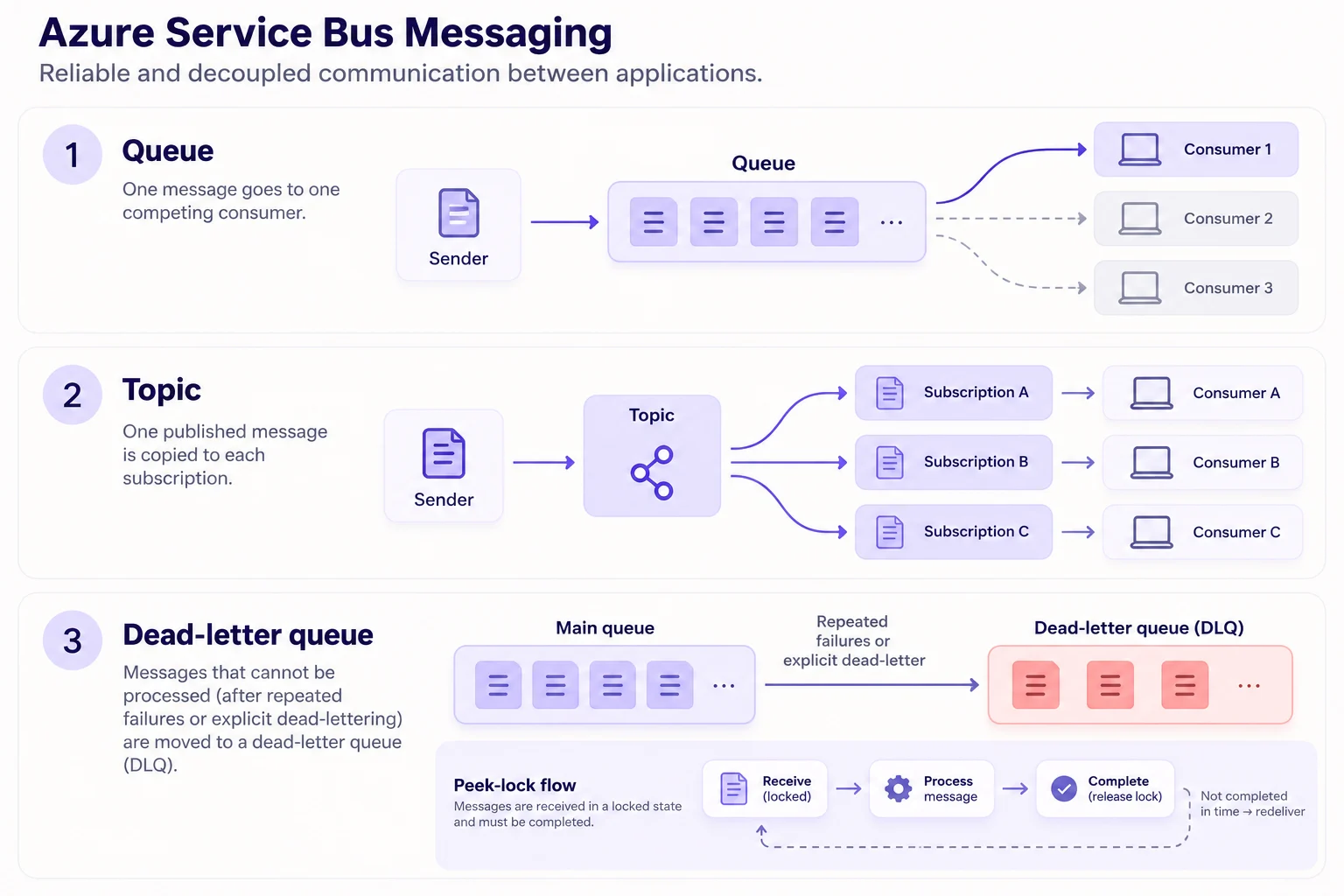
Use a queue when competing workers should process each message once. Use a topic when several consumers each need their own copy through separate subscriptions.
Settle peek-lock messages
Complete removes a successful message. Abandon releases it for delivery again. Defer keeps it aside until code receives it by sequence number. Dead-letter moves a message that should not be retried into the .
For long handlers, renew the message lock before it expires. Otherwise the same message can be delivered again and its delivery count rises.
Filter subscriptions
A new subscription starts with a True filter, so it receives every topic message. Use a SQL filter for conditions on properties and a correlation filter for efficient equality matching. A rule action can change properties on the copy delivered to that subscription.
Inspect failures separately
Every queue and every subscription has its own dead-letter subqueue. Automatic failures can move messages there after the maximum delivery count, while application code can dead-letter immediately with a reason.
Key points
- Queue: competing consumers, one receiver processes each message
- Topic: each matching subscription receives its own copy
- : complete, abandon, defer, or dead-letter after processing
- Lock renewal: required when processing can exceed the lock duration
- Subscription rules: True, SQL, or correlation filters plus optional actions
- : separate subqueue for every queue and subscription
Click an underlined term for a one-line explanation, or see them all in the glossary .
Exam trap
Abandoning or lock expiry does not dead-letter a message; the delivery count rises until it passes the maximum, or code calls dead_letter_message.
Sources · 4 Microsoft Learn pages Show ▾
- Azure Service Bus queues, topics, and subscriptions
- Service Bus dead-letter queues
- Message transfers, locks, and settlement
- ServiceBusClient class (azure-servicebus for Python)
Checked on October 4, 2026. Report a problem
Go deeper on Microsoft Learn
- Azure Service Bus queues, topics, and subscriptions
- Service Bus dead-letter queues
- Message transfers, locks, and settlement
- ServiceBusClient class (azure-servicebus for Python)
Checked against Microsoft Learn on October 4, 2026. Report a problem with this card