DP-600 · 3.1.5 · Implement and manage semantic models
Calculation groups and parameters
Implement calculation groups, dynamic format strings, and field parameters
Reuse patterns with , preserve numeric values with dynamic formats, and let readers swap fields with .
Reduce repeated measures
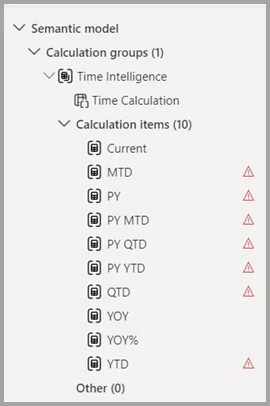
replace families of near-identical with reusable that apply to explicit measures.
change how a value is displayed while keeping the result numeric. That makes them safer than FORMAT when the value still needs to work in charts or .
solve a different problem: they let report readers choose which fields or measures a visual uses, usually through a slicer.
Key points
- : reuses one pattern across
- Dynamic format: changes display without converting to text
- : lets users swap fields or measures
- Precedence: controls nesting when groups overlap
Click an underlined term for a one-line explanation, or see them all in the glossary .
Exam trap
affect explicit , not plain aggregated columns. Create explicit measures before expecting to apply.
Sources · 3 Microsoft Learn pages Show ▾
- Create calculation groups in Power BI
- Create dynamic format strings for measures
- Use Field Parameters in Power BI Reports
Checked on October 4, 2026. Report a problem
Go deeper on Microsoft Learn
- Create calculation groups in Power BI
- Create dynamic format strings for measures
- Use Field Parameters in Power BI Reports
Checked against Microsoft Learn on October 4, 2026. Report a problem with this card