DP-600 · 3.1.3 · Implement and manage semantic models
Relationships and bridges
Implement relationships, such as bridge tables and many-to-many relationships
Prefer one-to-many ; use for many-to-many dimensions and limit .
Keep filter paths predictable
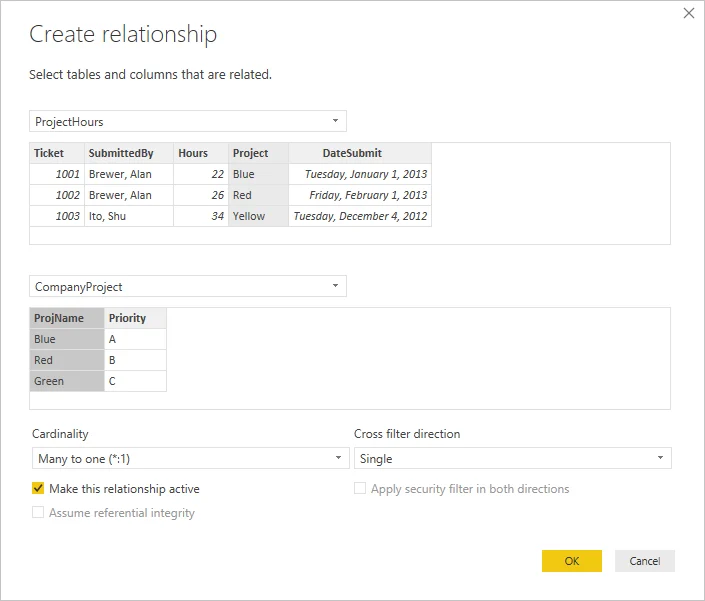
One-to-many with a single filter direction is the standard Power BI pattern.
When two dimensions relate many-to-many, introduce a with one row per valid pair and relate each dimension to that bridge. This preserves unique keys on the dimension sides.
Use only when the model genuinely needs it. Broad use can create ambiguous paths and slower queries. CROSSFILTER is often safer when only one needs a temporary direction change.
Key points
- One-to-many: preferred shape
- Bridge: resolves many-to-many between dimensions
- Both direction: use only when a filter path requires it
- CROSSFILTER: changes direction for one
Click an underlined term for a one-line explanation, or see them all in the glossary .
Exam trap
Setting every to to make filters work. It slows queries and creates ambiguous paths. Fix the one relationship that needs it, or use CROSSFILTER in a .
Sources · 3 Microsoft Learn pages Show ▾
- Many-to-many relationship guidance
- Model relationships in Power BI Desktop
- Bi-directional relationship guidance
Checked on October 4, 2026. Report a problem
Go deeper on Microsoft Learn
- Many-to-many relationship guidance
- Model relationships in Power BI Desktop
- Bi-directional relationship guidance
Checked against Microsoft Learn on October 4, 2026. Report a problem with this card