DP-600 · 1.2.3 · Maintain a data analytics solution
Deployment pipelines
Create and configure deployment pipelines
Move Fabric item definitions through Development, Test, and Production while adapt each target environment.
The core idea
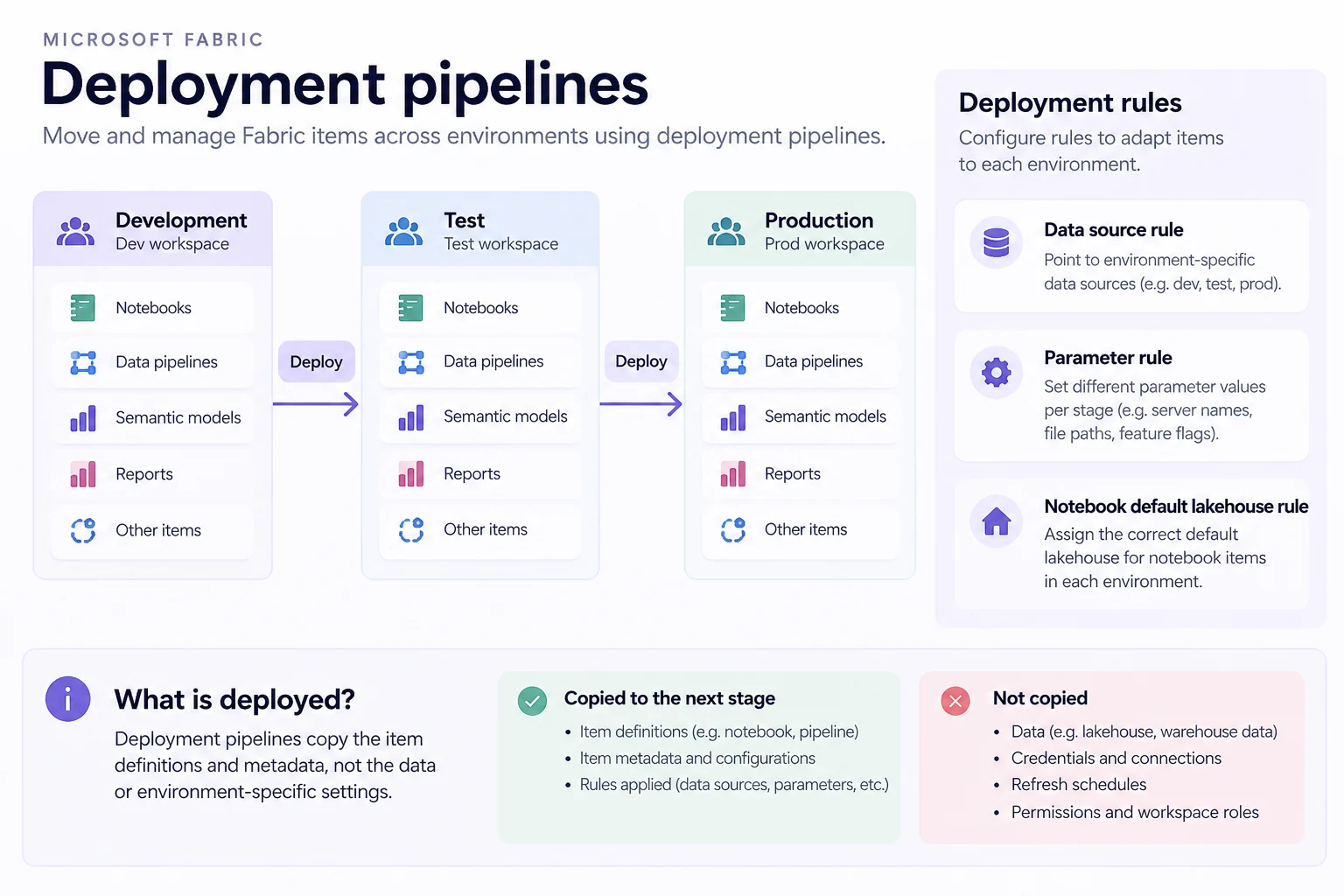
A promotes Fabric items through stage workspaces, usually Development, Test, and Production. Deployments copy item definitions and metadata, not the underlying data or environment-specific credentials.
belong to the target stage. Use them to switch data sources, parameter values, or a 's default .
Fabric pairs matching items across stages. Missing dependencies can block deployment, while unpaired look-alike items can create duplicates.
Key points
- Stages: each stage maps to its own workspace
- Deploy: item definitions move to the adjacent stage
- Rules: target stages can swap sources, parameters, or
- Data: permissions, credentials, schedules, and data are not copied
Click an underlined term for a one-line explanation, or see them all in the glossary .
Exam trap
A new changes nothing until the next deployment to that stage, and it cannot be created in the Development stage.
Sources · 3 Microsoft Learn pages Show ▾
Checked on October 4, 2026. Report a problem
Go deeper on Microsoft Learn
Checked against Microsoft Learn on October 4, 2026. Report a problem with this card