DP-600 · 3.2.1 · Implement and manage semantic models
Query and visual performance
Implement performance improvements in queries and report visuals
Use to identify whether time is spent in , , rendering, or other visual work before optimizing.
Optimize the layer that is actually slow
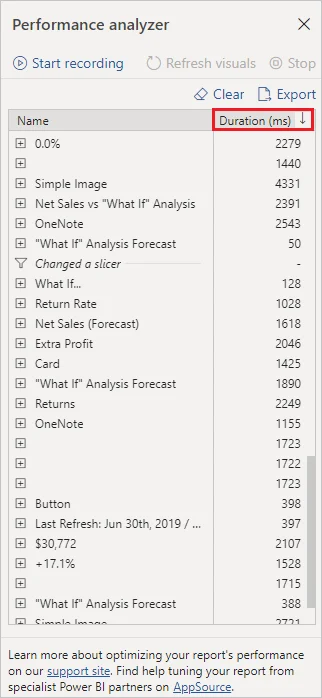
separates a visual's load into , , visual display, and other time. That breakdown tells you where to investigate.
Large time points to or model design. Large DirectQuery time points to the source or query folding. Large visual display time means the report is drawing too much.
For large DirectQuery facts, an imported can answer common summary queries from memory while detailed queries still reach the source.
Key points
- first: use before changing the model
- time: inspect measures and model design
- time: inspect source and query folding
- Visual display: reduce data points and visual complexity
Click an underlined term for a one-line explanation, or see them all in the glossary .
Exam trap
Tuning the does not help when the time is not in the . Read the breakdown first, clear the cache, and measure again after each fix.
Sources · 3 Microsoft Learn pages Show ▾
- Use Performance Analyzer to examine report performance (Power BI)
- Troubleshoot common performance issues (Optimize semantic model performance)
- User-defined aggregations (Power BI)
Checked on October 4, 2026. Report a problem
Go deeper on Microsoft Learn
- Use Performance Analyzer to examine report performance (Power BI)
- Troubleshoot common performance issues (Optimize semantic model performance)
- User-defined aggregations (Power BI)
Checked against Microsoft Learn on October 4, 2026. Report a problem with this card