DP-600 · 1.1.4 · Maintain a data analytics solution
Sensitivity labels
Apply sensitivity labels to items
Apply Microsoft Purview to classify Fabric items and carry protection through supported downstream content and exports.
The core idea
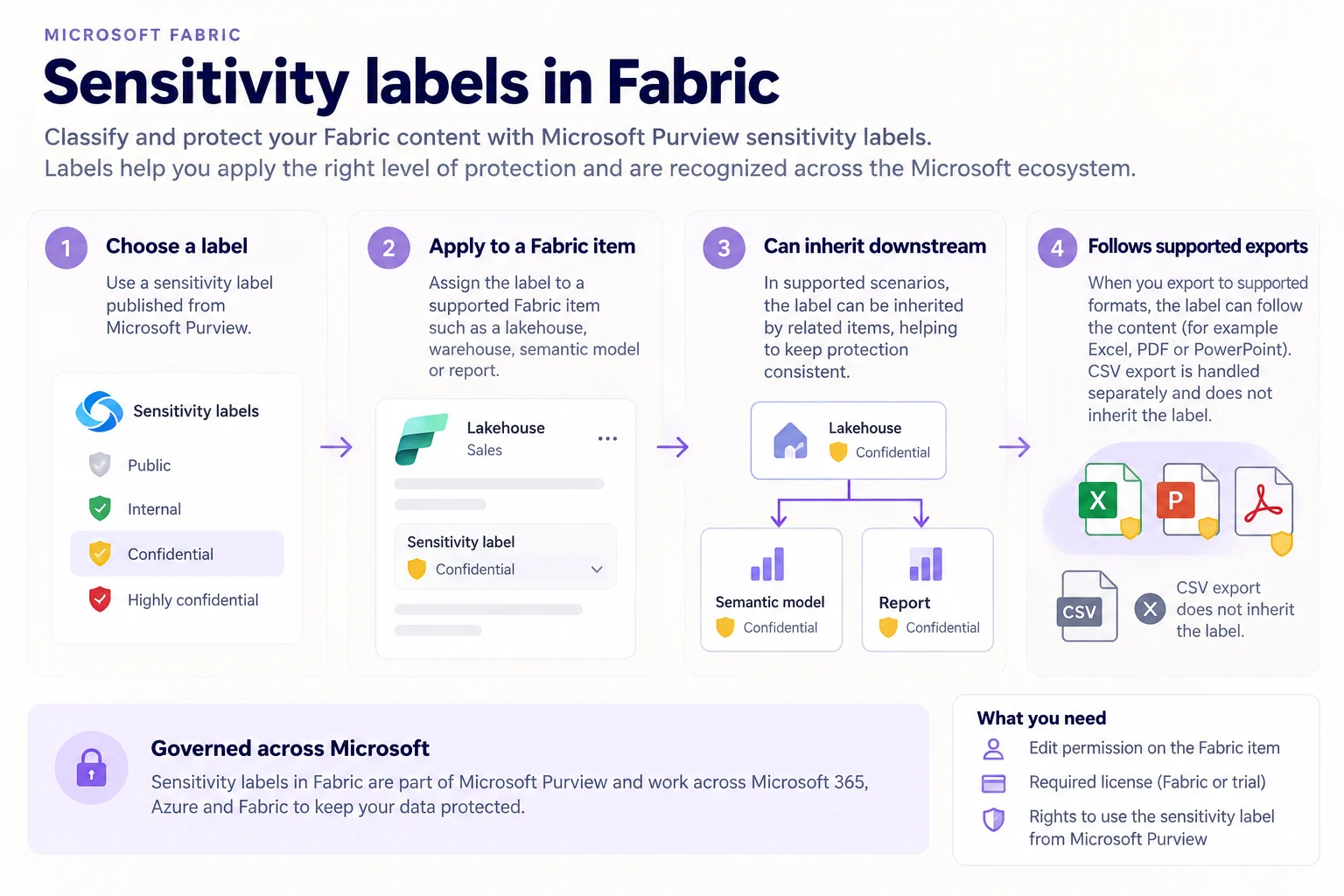
come from Microsoft Purview Information Protection. A user needs Edit permission on the Fabric item, the required Power BI licensing, and permission to use the selected label.
Policies can also assign labels automatically. applies a preset label, while prevents a Power BI item from being saved without one.
Labels can inherit downstream in supported scenarios. Excel, PDF, and PowerPoint exports can retain the label, while CSV exports do not.
Key points
- Purview: publishes the
- Edit access: required to label a Fabric item
- Policies: can enforce default or
- Inheritance: can flow to supported
- Exports: supported formats can retain the label
Click an underlined term for a one-line explanation, or see them all in the glossary .
Exam trap
Having Edit permission on a Fabric item is not enough by itself. The user must also meet licensing requirements and be allowed to use the .
Sources · 2 Microsoft Learn pages Show ▾
Checked on October 4, 2026. Report a problem
Go deeper on Microsoft Learn
Checked against Microsoft Learn on October 4, 2026. Report a problem with this card