DP-600 · 2.3.4 · Prepare data
DAX queries
Select, filter, and aggregate data by using DAX
A uses optional DEFINE, required EVALUATE, and optional ORDER BY to return and shape a table from a .
The core idea
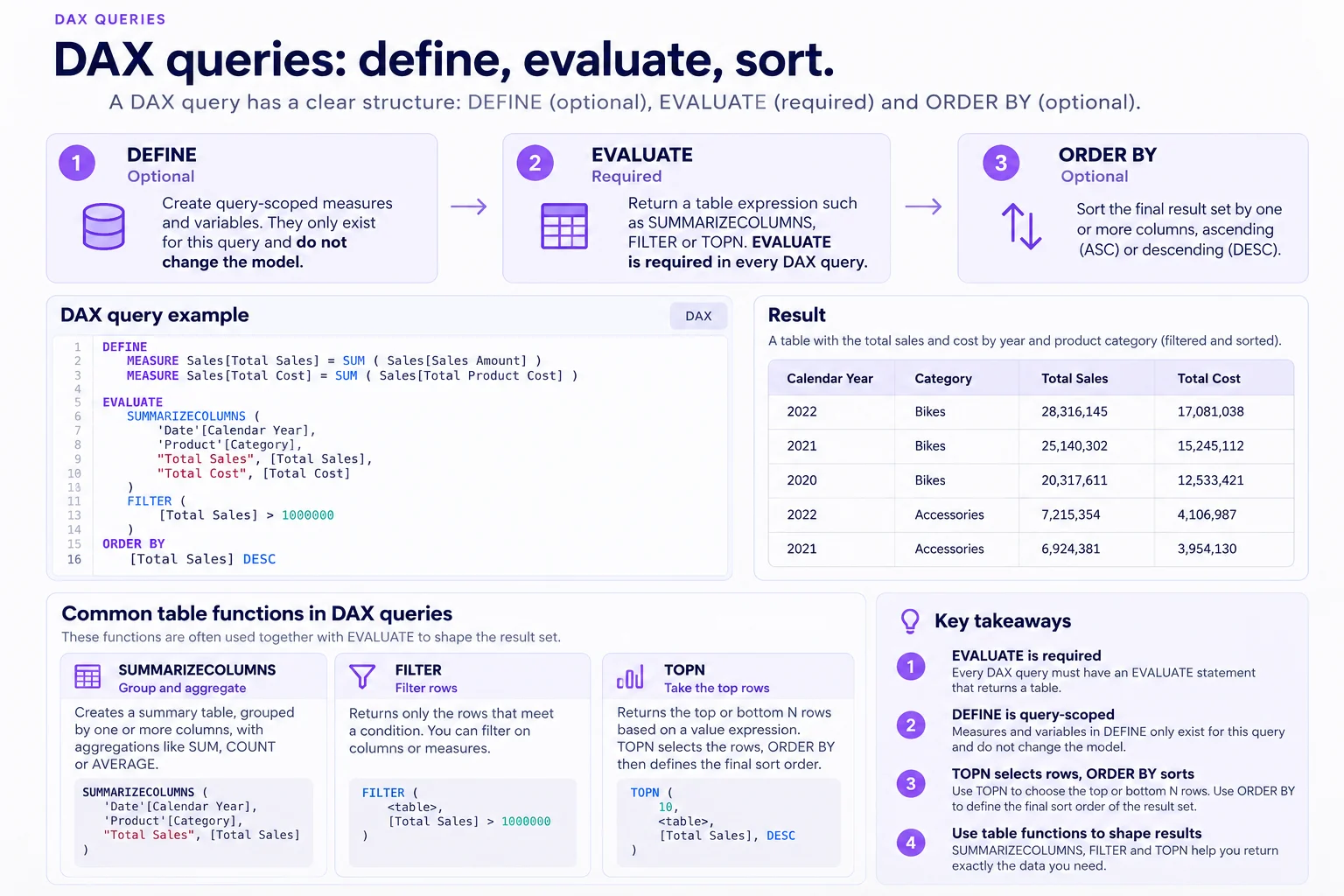
Every must contain EVALUATE followed by a table expression. DEFINE is optional and can create or variables that exist only for that query.
is a common way to group and aggregate model data. FILTER narrows rows, and TOPN chooses the rows to return.
ORDER BY sorts the final result. It does not decide which rows TOPN selected.
Key points
- DEFINE: creates query-scoped and variables
- EVALUATE: required and returns a table expression
- : groups and calculates result columns
- TOPN: chooses rows; ORDER BY only sorts the result
Click an underlined term for a one-line explanation, or see them all in the glossary .
Exam trap
TOPN chooses rows but does not guarantee final display order. Use ORDER BY to sort the returned result.
Sources · 3 Microsoft Learn pages Show ▾
Checked on October 4, 2026. Report a problem
Go deeper on Microsoft Learn
Checked against Microsoft Learn on October 4, 2026. Report a problem with this card