DP-600 · 1.2.1 · Maintain a data analytics solution
Workspace Git control
Configure version control for a workspace
Commit workspace changes to Git, update the workspace from Git, and resolve same-item conflicts before synchronizing.
The core idea
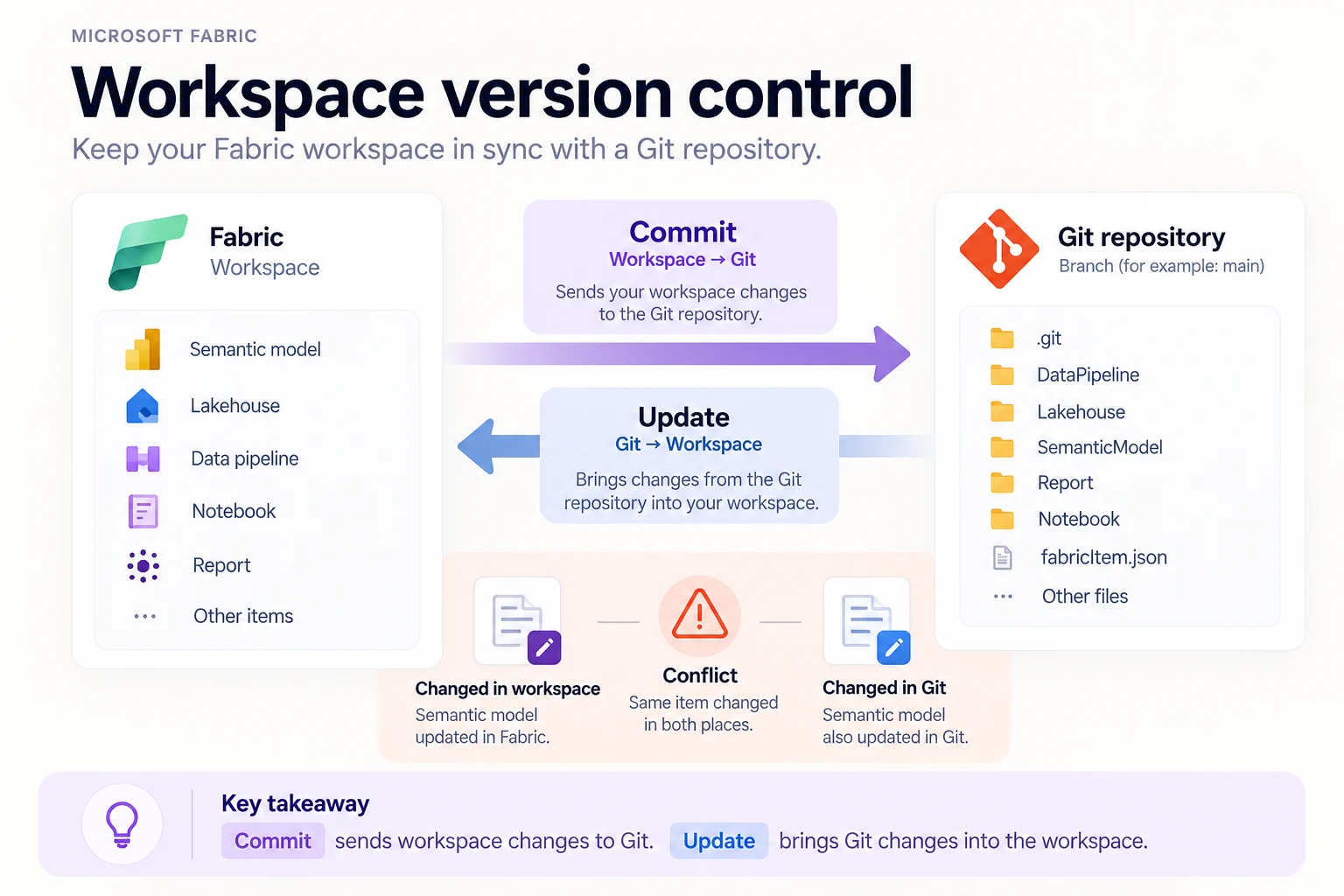
connects supported Fabric item definitions to one repository branch and folder. Commit moves selected workspace changes to Git. Update applies incoming Git changes to the workspace.
The Source control pane shows outgoing changes, incoming updates, conflicts, the connected branch, and the last synchronized commit.
A conflict appears when the same item changed in both places. Resolve it before synchronizing. Establishing the Git connection requires a workspace Admin.
Key points
- Connection: workspace links to one repository, branch, and folder
- Commit: workspace to Git
- Update: Git to workspace
- Conflicts: same item changed on both sides must be resolved
Click an underlined term for a one-line explanation, or see them all in the glossary .
Exam trap
Commit and Update move changes in opposite directions. Commit writes workspace changes to Git; Update applies Git changes to the workspace.
Sources · 2 Microsoft Learn pages Show ▾
Checked on October 4, 2026. Report a problem
Go deeper on Microsoft Learn
Checked against Microsoft Learn on October 4, 2026. Report a problem with this card