DP-600 · 3.1.1 · Implement and manage semantic models
Semantic model storage
Choose a storage mode
Choose Import, , Dual, or by freshness, scale, source, and performance requirements.
Choose by the constraint
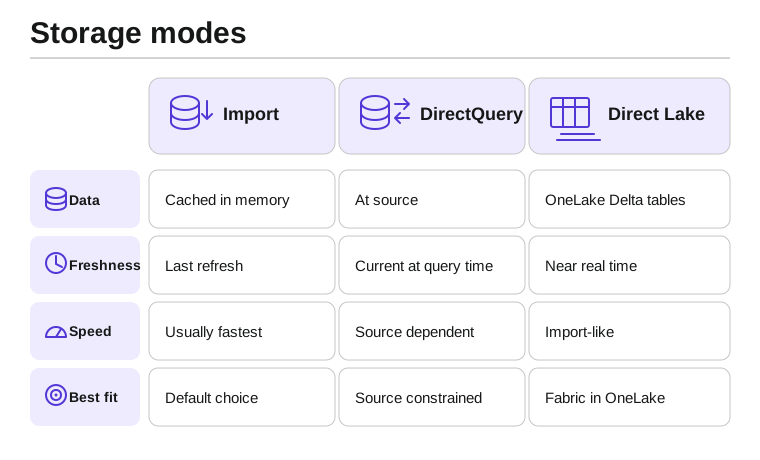
Import is the default choice when refresh-based freshness is acceptable. It keeps a compressed copy in memory and normally gives the fastest report interaction.
leaves data at the source and queries it when visuals load. Dual lets a table behave as Import or DirectQuery depending on the query, which is especially useful for dimensions beside DirectQuery facts.
reads from without a full Import copy and is designed for large Fabric data with low-latency analytical access.
Key points
- Import: fastest in-memory experience after refresh
- : queries the source for each visual
- Dual: can answer from cache or source
- : reads Delta data with Import-like speed
Click an underlined term for a one-line explanation, or see them all in the glossary .
Exam trap
Do not choose only for freshness. Import is usually faster; use DirectQuery when source access, scale, or latency requirements justify it.
Sources · 3 Microsoft Learn pages Show ▾
- Table storage mode in Power BI semantic models
- DirectQuery in Power BI: When to Use, Limitations, Alternatives
- Direct Lake overview
Checked on October 4, 2026. Report a problem
Go deeper on Microsoft Learn
- Table storage mode in Power BI semantic models
- DirectQuery in Power BI: When to Use, Limitations, Alternatives
- Direct Lake overview
Checked against Microsoft Learn on October 4, 2026. Report a problem with this card