DP-750 · 4.1.2 · Deploy and maintain data pipelines and workloads
Notebook or pipeline
Choose between notebook and Lakeflow Spark Declarative Pipelines
Use notebooks for custom imperative workflows and Lakeflow pipelines for declarative batch or streaming data transformations with managed operations.
See the declarative experience
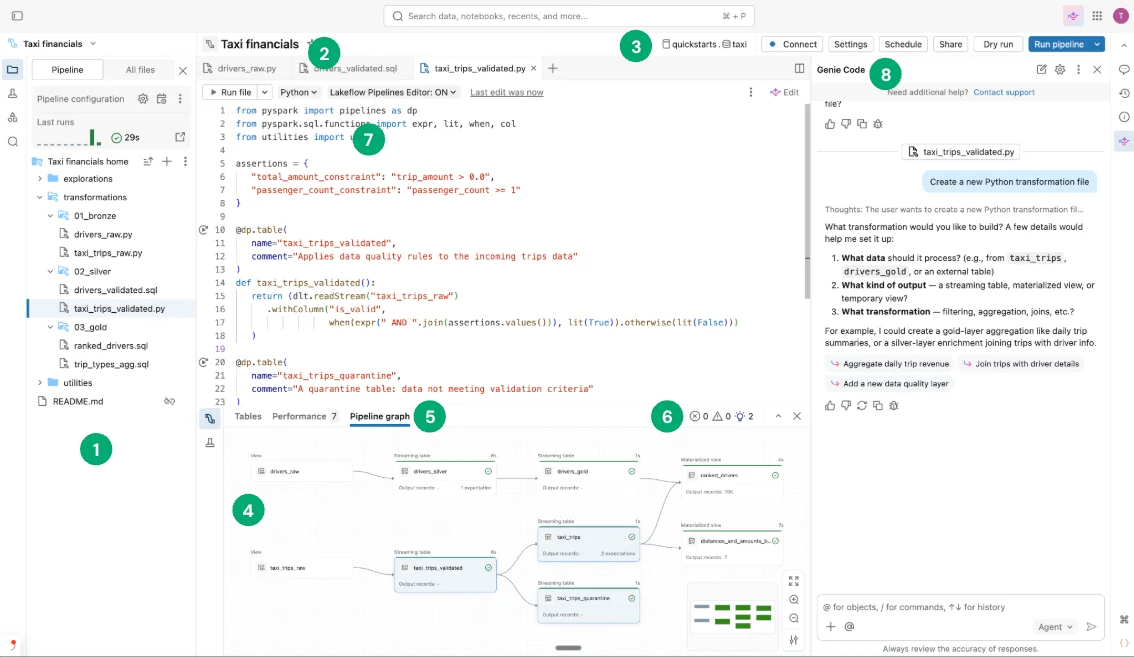
Lakeflow Spark Declarative Pipelines center the workflow on maintained datasets and their dependencies rather than on manually sequenced execution steps.
Choose the programming model
Notebook
- Style
- Imperative
- Best for
- Custom procedural logic
- Dependencies
- Explicit orchestration
- Quality
- Custom code
Lakeflow pipeline
- Style
- Declarative
- Best for
- Maintained data graph
- Dependencies
- Inferred from datasets
- Quality
- Native expectations
Use notebooks when custom APIs, branching code, specialized libraries, or non-tabular control are central.
Avoid manual orchestration when the graph already knows
If one maintained dataset reads another, let the declarative dependency graph determine execution order.
Key points
- Notebook: Flexible imperative code and custom control
- Lakeflow pipeline: Declarative dataset dependencies
- Pipeline features: Managed updates, quality, lineage, monitoring
- Choice: Prefer pipeline when dataflow semantics fit
Exam trap
Do not wrap every transformation in orchestration notebooks when declarative datasets can express the dependency graph directly.
Sources · 2 Microsoft Learn pages Show ▾
Checked on October 4, 2026. Report a problem
Go deeper on Microsoft Learn
Checked against Microsoft Learn on October 4, 2026. Report a problem with this card