DP-750 · 4.3.5 · Deploy and maintain data pipelines and workloads
Deploy bundle with CLI
Deploy a bundle by using the Databricks CLI
Validate bundle configuration, authenticate to the intended target, then deploy from the bundle root with the Databricks CLI.
Follow the bundle lifecycle
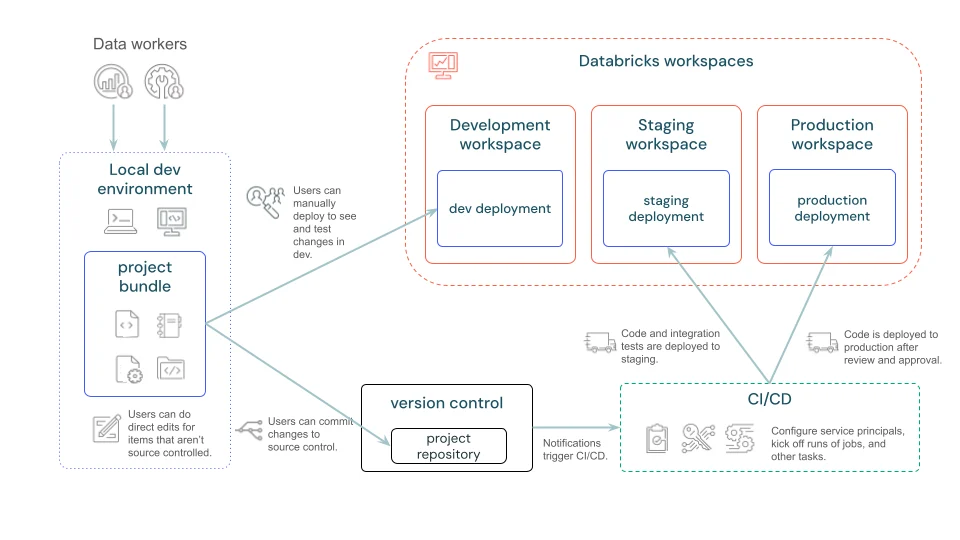
The CLI moves the same version-controlled bundle into the selected target environment.
Validate before deploy
- 1Choose targetResolve environment settings
- 2bundle validateCheck resolved configuration
- 3bundle deployCreate or update resources
- 4bundle runExecute a deployed resource if needed
- 5VerifyConfirm target behavior
Validation catches configuration and target mistakes before resources change.
Use a deployment identity
- Human local developmentSupported user OAuth
- Unattended pipelineLeast-privilege service principal OAuth
Do not use a personal credential for production automation.
Key points
- bundle validate: Checks resolved configuration
- Target: Selects workspace and environment overrides
- bundle deploy: Creates or updates declared resources
- bundle run: Executes a deployed resource when required
Exam trap
Validate the resolved target before production deployment so a correct bundle is not sent to the wrong workspace.
Sources · 2 Microsoft Learn pages Show ▾
Checked on October 4, 2026. Report a problem
Go deeper on Microsoft Learn
Checked against Microsoft Learn on October 4, 2026. Report a problem with this card