DP-750 · 3.3.6 · Prepare and process data
Reshape data
Transform data by denormalizing, pivoting, and unpivoting data
Denormalize to reduce joins for consumption, pivot rows into columns, and unpivot wide columns back into long form.
Use the SQL editor to validate shape changes
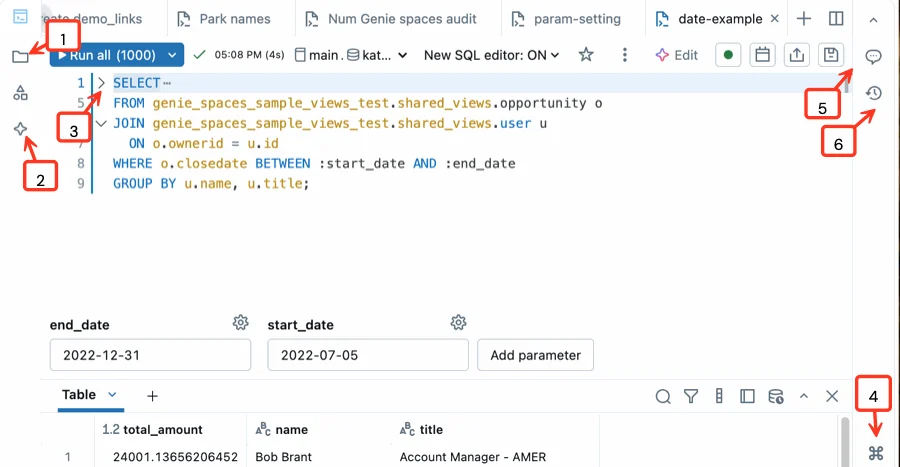
Pivoting and denormalizing are shape changes, so inspect the result set immediately after the query. The real editor anchors that workflow; the diagrams below show how rows and columns move.
Reshape for the consumer
- Repeated joins make analysis cumbersomeDenormalize selectively
- Category values should become columnsPivot
- Repeated columns should become rowsUnpivot
Denormalization trades redundancy for simpler reads. Use it when consumption patterns justify duplicated attributes.
Pivot and unpivot change shape
Pivot
- Input
- Category rows
- Output
- Category columns
- Aggregation
- Often required
Unpivot
- Input
- Repeated columns
- Output
- Variable-value rows
- Aggregation
- Not inherently
A pivot commonly aggregates while creating columns.
Shape is not history
Unpivoting a previously aggregated pivot can change layout again, but it cannot restore detail that aggregation already removed.
Key points
- Denormalize: Duplicate selected attributes to simplify reads
- Pivot: Turns values into columns with aggregation
- Unpivot: Turns value columns into variable-value rows
- Tradeoff: Easier reads can increase redundancy and update complexity
Exam trap
A pivot normally aggregates; it is not a lossless inverse of unpivot in every case.
Sources · 3 Microsoft Learn pages Show ▾
Checked on October 4, 2026. Report a problem
Go deeper on Microsoft Learn
Checked against Microsoft Learn on October 4, 2026. Report a problem with this card