DP-750 · 2.2.3 · Secure and govern Unity Catalog objects
Row filters and masks
Configure row filters and column masks
Attach UDF-based row filters and column masks when a table needs fine-grained query-time access logic.
Pick the right query-time rule
Row filter
- Result
- Removes disallowed rows
- Function output
- Boolean
- Example
- Region access
Column mask
- Result
- Rewrites one value
- Function output
- Compatible column value
- Example
- Redact email
A row filter decides whether each row is visible. A column mask returns the original or transformed value for one column.
Bind logic centrally
- 1SQL UDFEncapsulates access logic
- 2Table bindingAttaches filter or mask
- 3Query principalProvides identity context
- 4ResultFiltered rows or masked values
The masking function must return a value compatible with the masked column type.
Know when ABAC is better
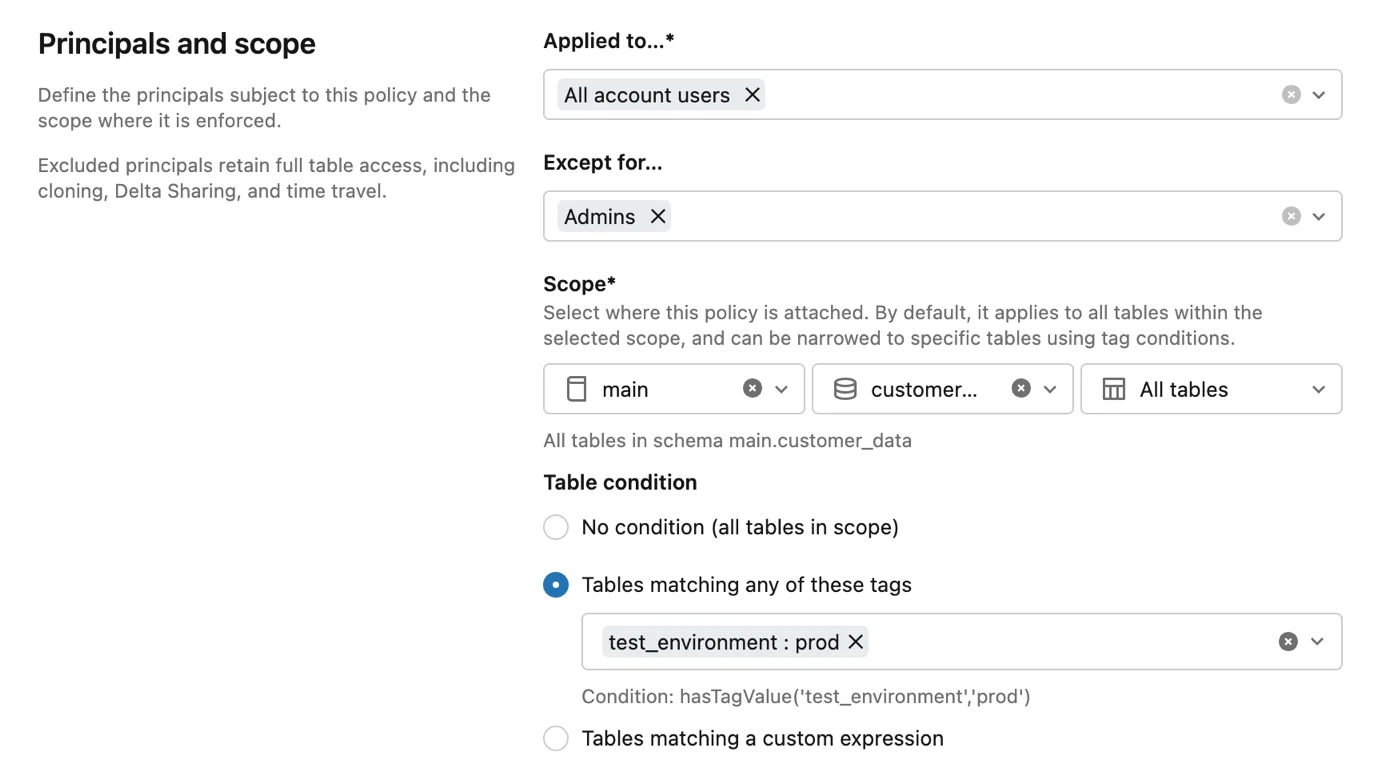
Use direct table filters for object-specific logic. Use ABAC when the same rule should follow tagged objects at scale.
Key points
- Row filter: Returns only rows allowed by a Boolean condition
- Column mask: Rewrites one column's displayed value
- UDF: Encapsulates access logic
- ABAC: Prefer for consistent policy across many tables
Exam trap
Column mask output must remain compatible with the masked column's data type.
Sources · 1 Microsoft Learn page Show ▾
Checked on October 4, 2026. Report a problem
Go deeper on Microsoft Learn
Checked against Microsoft Learn on October 4, 2026. Report a problem with this card