DP-750 · 3.2.4 · Prepare and process data
CDC ingestion
Ingest data by using a change data capture (CDC) feed
Apply inserts, updates, and deletes from a change feed in event order instead of repeatedly reloading full snapshots.
See what a change feed contains
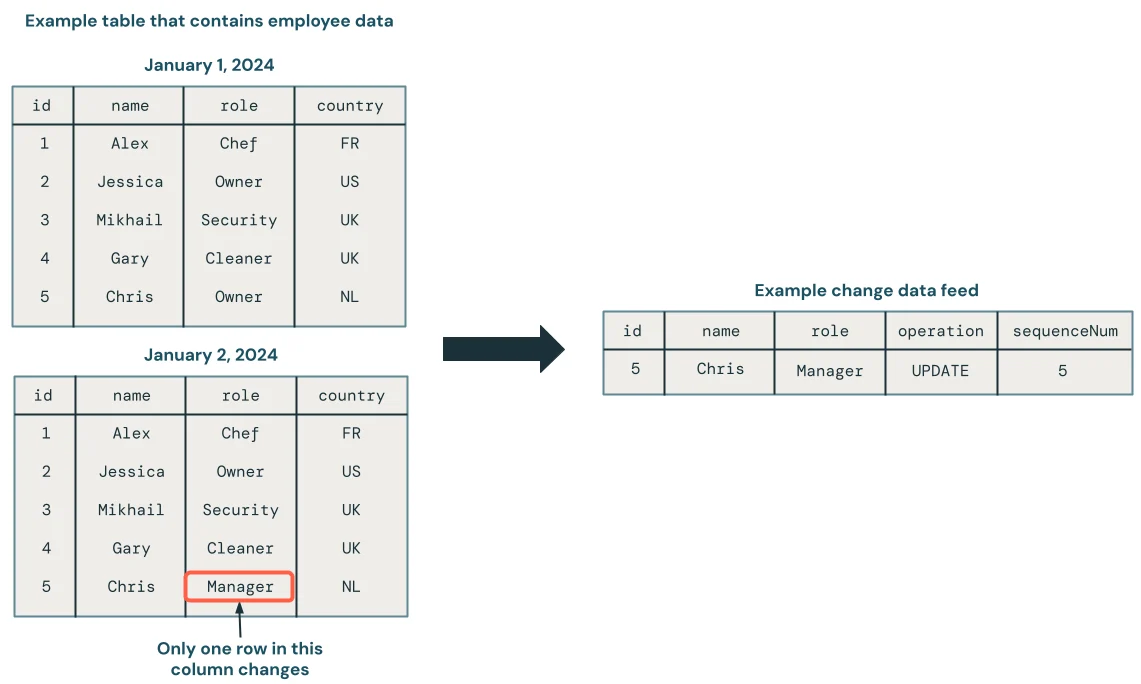
A CDC feed carries only inserts, updates, and deletes, plus metadata such as operation type and a sequencing value.
Apply changes in logical order
- 1Initial hydrationLoad current source state
- 2Stable keyIdentify the target entity
- 3Change eventsCapture inserts, updates, deletes
- 4SequenceOrder events correctly
- 5TargetApply the resulting state
Arrival order is not always business order. AUTO CDC can use a sequencing column to handle out-of-order events.
CDC versus snapshots
CDC feed
- Contains
- Only changes
- Best API
- AUTO CDC
- Efficiency
- Incremental
Snapshot
- Contains
- Full table state
- Best API
- AUTO CDC FROM SNAPSHOT
- Efficiency
- Compare versions
Use real CDC when the source exposes it instead of repeatedly reloading complete snapshots.
Key points
- CDC feed: Carries row-level source changes
- Keys: Identify records that changes belong to
- Sequence: Defines correct event order
- AUTO CDC: Applies changes to streaming targets declaratively
Exam trap
CDC needs reliable keys and sequencing; arrival order alone may not equal business change order.
Sources · 2 Microsoft Learn pages Show ▾
Checked on October 4, 2026. Report a problem
Go deeper on Microsoft Learn
Checked against Microsoft Learn on October 4, 2026. Report a problem with this card