DP-750 · 1.2.7 · Set up and configure an Azure Databricks environment
DDL for tables
Implement data definition language (DDL) operations on managed and external tables
Use DDL to create and alter managed or external tables while preserving the intended storage ownership model.
Start with storage ownership
Managed
- Metadata
- Unity Catalog
- File lifecycle
- Managed by Databricks
- Typical fit
- New governed data
External
- Metadata
- Unity Catalog
- File lifecycle
- Managed outside Databricks
- Typical fit
- Existing cloud files
Both table types are governed in Unity Catalog. The difference is who owns the underlying files and their lifecycle.
Understand the object location
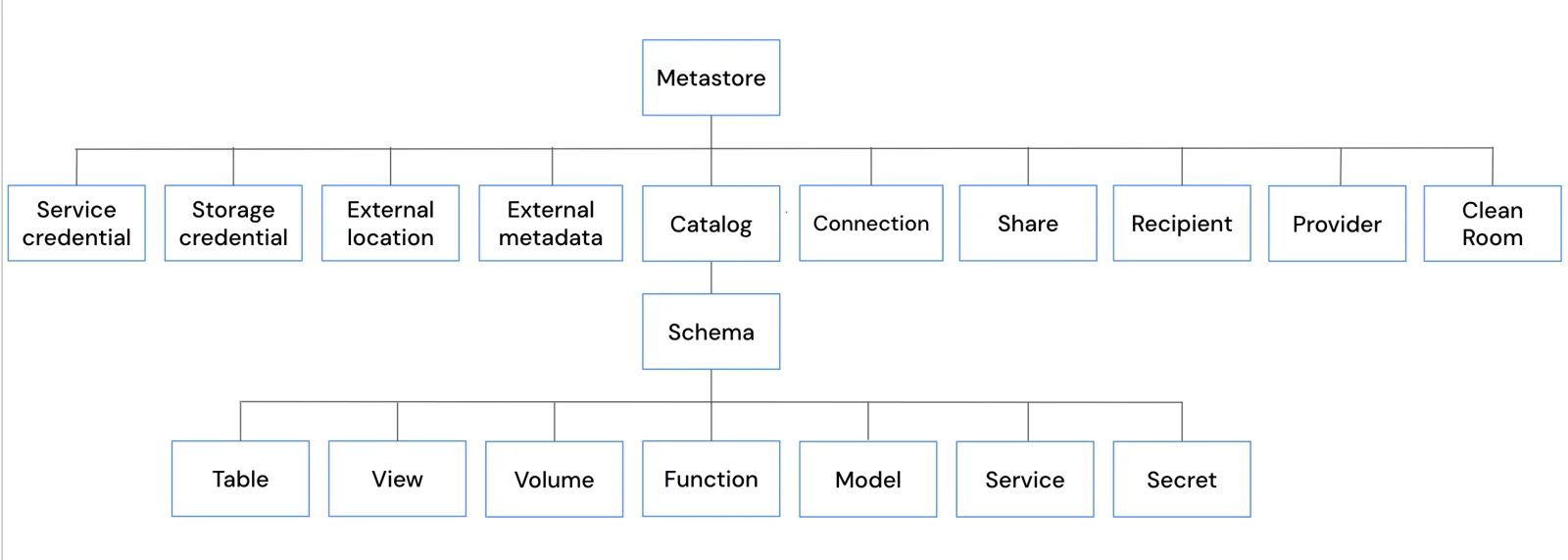
Managed and external tables occupy the same namespace position. DDL changes metadata and definitions, but it does not erase the storage-ownership distinction.
CREATE, ALTER, DROP
- 1CREATEChoose managed or external ownership
- 2ALTERChange schema or metadata
- 3DROP managedManaged data lifecycle is removed
- 4DROP externalMetadata goes, external files remain
The exam often tests DROP behavior. External source files remain independently managed after the table metadata is removed.
Key points
- Managed table: Unity Catalog manages data lifecycle and storage
- External table: Metadata points to externally managed files
- DDL: CREATE, ALTER, and DROP change metadata and definitions
- DROP behavior: Know whether data should remain outside Databricks control
Exam trap
Dropping an external table removes metadata, not the externally managed source files.
Sources · 4 Microsoft Learn pages Show ▾
- Azure Databricks tables
- Work with external tables
- CREATE TABLE [USING]
- Update table schemas with schema evolution
Checked on October 4, 2026. Report a problem
Go deeper on Microsoft Learn
- Azure Databricks tables
- Work with external tables
- CREATE TABLE [USING]
- Update table schemas with schema evolution
Checked against Microsoft Learn on October 4, 2026. Report a problem with this card