DP-750 · 4.4.1 · Deploy and maintain data pipelines and workloads
Monitor compute use
Monitor and manage cluster consumption to optimize performance and cost
Right-size compute from CPU, memory, task, shuffle, and I/O metrics instead of assuming more nodes always improve performance.
Measure before you resize
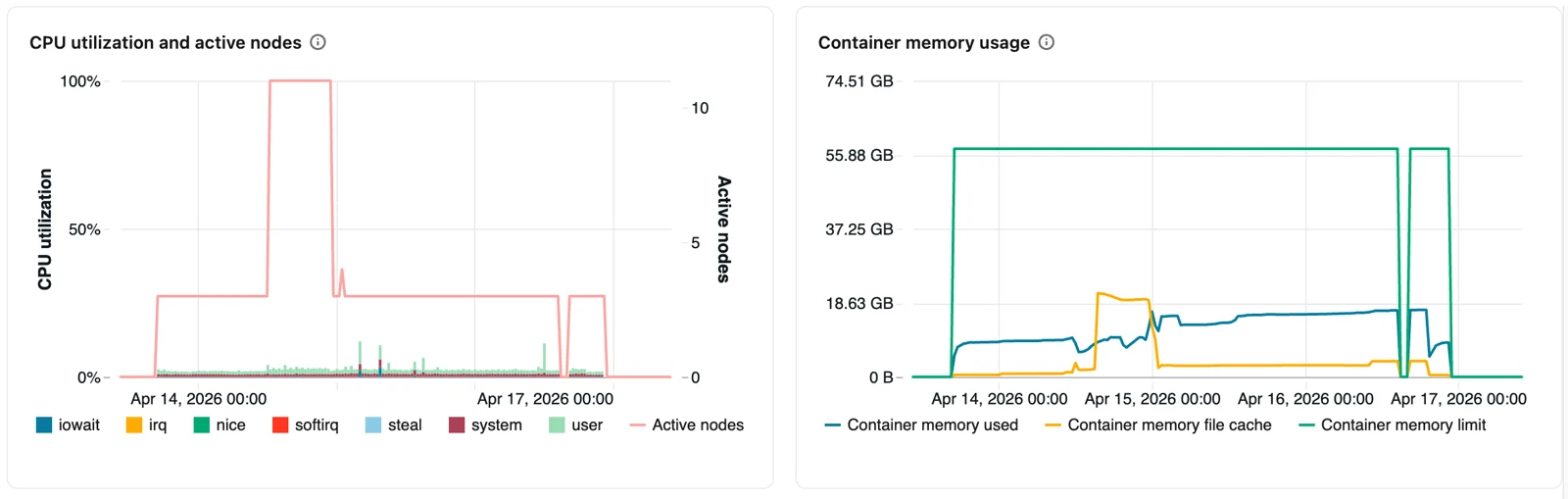
Compute metrics expose CPU, active nodes, memory, network, filesystem, task, and shuffle behavior. Right-sizing starts with these measurements rather than with a larger cluster.
Interpret the symptom
- CPU stays low across many workersCheck for overprovisioning
- Memory is high or tasks spillCheck per-task memory pressure
- Shuffle read and write are largeInspect joins and partitioning
- Parallel demand varies over timeConsider autoscaling
More workers increase parallel capacity but do not fix skew, spills, or inefficient transformations.
Tune as a loop
- 1MeasureCapture utilization and cost
- 2DiagnoseFind the limiting resource
- 3Change one settingSize, workers, or autoscaling
- 4Re-measureConfirm the effect
Optimize performance and cost together.
Key points
- CPU: Reveals whether workers are actively computing or underused
- Memory: Exposes heap pressure and possible spill or OOM risk
- Tasks: Shows work distribution and failed-task patterns
- Shuffle and I/O: Reveal expensive data movement or storage bottlenecks
Exam trap
Low utilization on an oversized cluster can waste cost without shortening the workload.
Sources · 2 Microsoft Learn pages Show ▾
Checked on October 4, 2026. Report a problem
Go deeper on Microsoft Learn
Checked against Microsoft Learn on October 4, 2026. Report a problem with this card