DP-750 · 4.3.2 · Deploy and maintain data pipelines and workloads
Branches and conflicts
Manage branching, pull requests, and conflict resolution
Develop on branches, review changes through pull requests in the Git provider, then merge and resolve conflicting edits deliberately.
See the change before it is merged
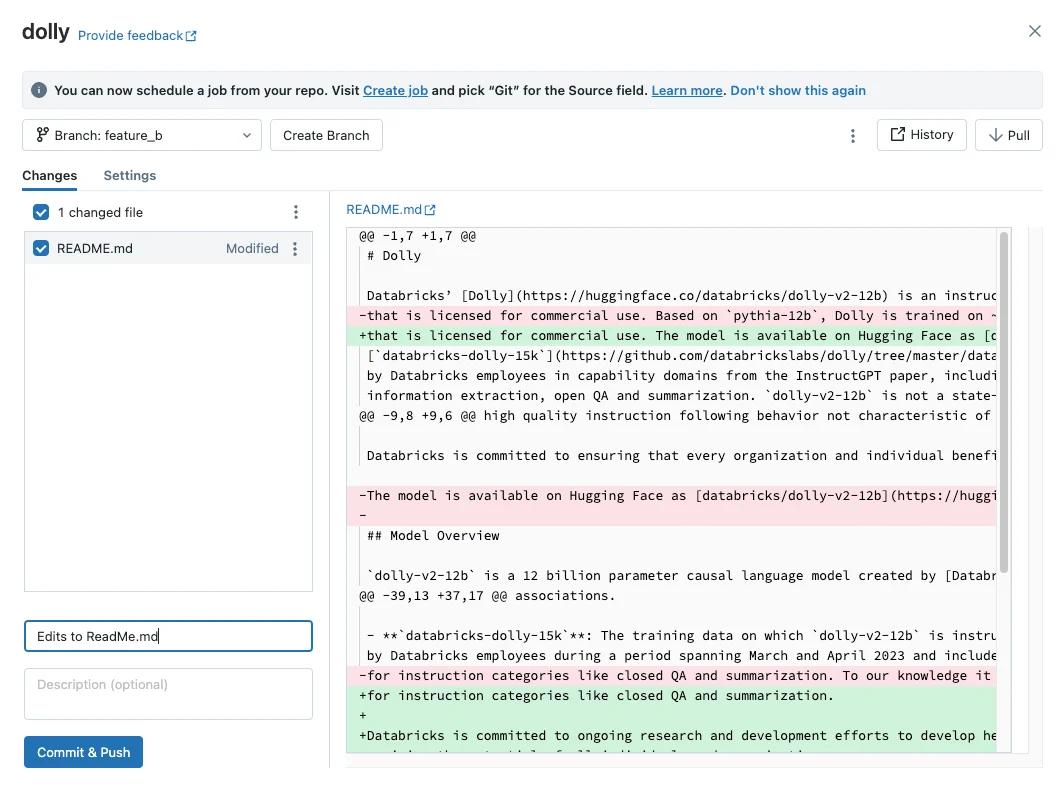
A branch workflow is about reviewing concrete diffs before integration. The Git dialog makes the changed lines and commit step visible; the diagrams below cover pull requests and conflict resolution.
Use branches to isolate change
- 1Stable branchReviewed shared code
- 2Feature branchIsolated development
- 3Pull requestDiscussion, checks, approval
- 4MergeIntegrate accepted changes
A feature branch lets development continue without changing stable shared code immediately.
Resolve conflicts intentionally
- Both edits are neededCombine them deliberately
- One edit supersedes the otherKeep the intended version
- Resolution changes behaviorRerun tests before merge
A conflict is not an error to bypass. It means Git cannot automatically reconcile overlapping histories.
Keep pull requests in the provider
Use the remote Git provider for review, approval, CI, and merge. Then update the Databricks Git folder to the merged branch state.
Key points
- Branch: Isolates a feature or fix
- Pull request: Review and gate merge in the remote Git provider
- Merge: Combines branch histories
- Conflict: Requires choosing how incompatible edits are reconciled
Exam trap
Resolve conflicts by understanding both changes, not by blindly accepting all current or incoming content.
Sources · 1 Microsoft Learn page Show ▾
Checked on October 4, 2026. Report a problem
Go deeper on Microsoft Learn
Checked against Microsoft Learn on October 4, 2026. Report a problem with this card