DP-750 · 3.4.1 · Prepare and process data
Validation checks
Implement validation checks, including nullability, data cardinality, and range checking
Turn business rules into explicit checks for required values, uniqueness or cardinality, and valid ranges.
See quality rules as explicit outcomes
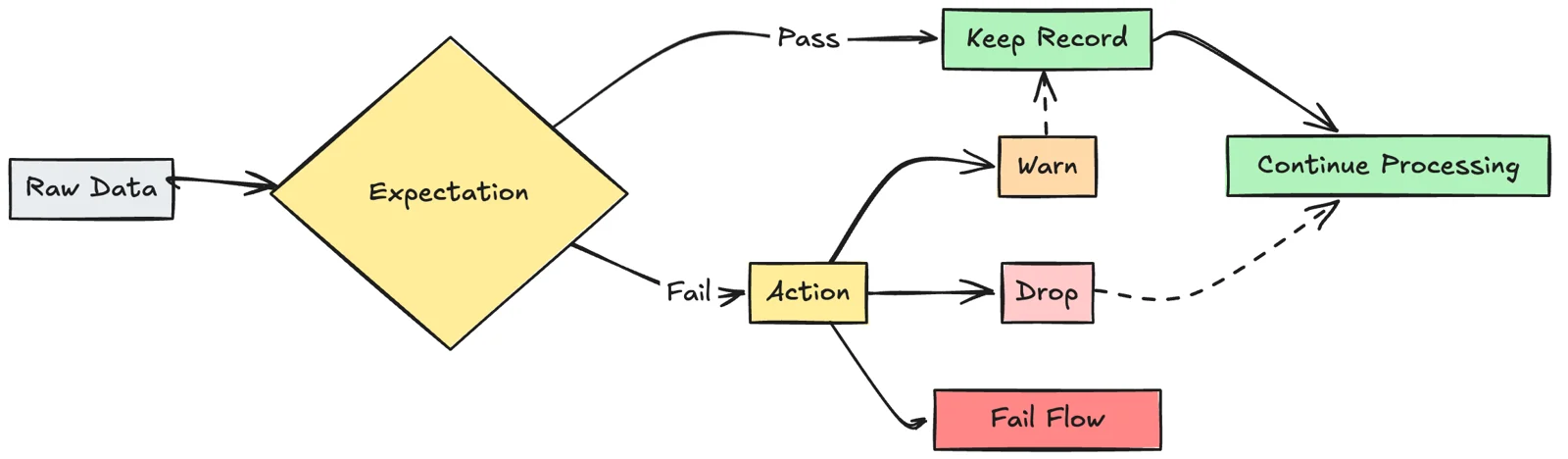
Validation is useful only when failures have a defined outcome. Expectations make the response explicit: warn, drop, or fail. The diagrams below focus on null, cardinality, and range checks.
Turn business rules into checks
- Required field must be presentNullability check
- Key must identify one recordCardinality or uniqueness check
- Value must stay inside limitsRange check
Validation should enforce explicit business rules rather than flagging a value merely because it is uncommon.
Choose the response by severity
- 1Detect violationRule fails
- 2Assess impactIs the record still usable?
- 3RecoverableWarn, drop, or quarantine
- 4CriticalFail the workload or update
A percentage outside 0 to 100 may be invalid, while a rare but valid category should not be rejected.
Validate at the right grain
Uniqueness must be tested where the business key is expected to be unique.
Key points
- Nullability: Required fields must not be missing
- Cardinality: Check expected uniqueness or category counts
- Range: Reject or flag values outside valid bounds
- Action: Decide whether bad records warn, drop, fail, or quarantine
Exam trap
Do not reject unusual values merely because they are rare; validate them against an actual business rule.
Sources · 2 Microsoft Learn pages Show ▾
Checked on October 4, 2026. Report a problem
Go deeper on Microsoft Learn
Checked against Microsoft Learn on October 4, 2026. Report a problem with this card