DP-750 · 4.3.4 · Deploy and maintain data pipelines and workloads
Configure bundles
Configure and package Declarative Automation Bundles
Package source, Databricks resources, variables, artifacts, and environment targets into a version-controlled Declarative Automation Bundle.
See the CI/CD role of a bundle
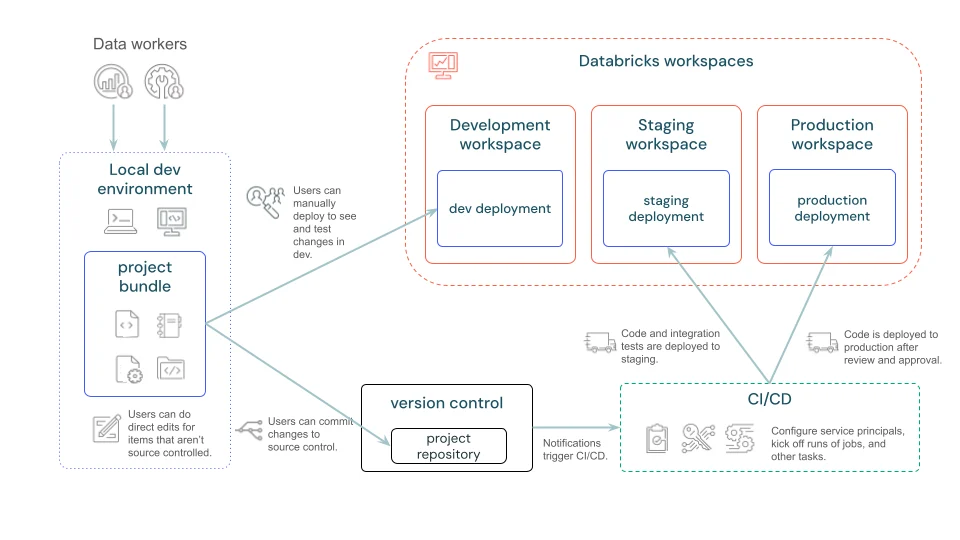
A bundle packages source code and Databricks resource definitions so the same version-controlled project can move through development, staging, and production.
Structure the bundle
- 1databricks.ymlRoot entry point
- 2ResourcesJobs, pipelines, dashboards, models
- 3VariablesReusable configurable values
- 4TargetsEnvironment-specific overrides
- 5Artifacts and filesDeployable project code
There is one root databricks.yml, which can include additional configuration files.
Keep environments as targets
Development
- Source
- Same repository
- Target
- dev
- Overrides
- Developer-friendly
Production
- Source
- Same repository
- Target
- prod
- Overrides
- Controlled production
Avoid copying separate bundle projects just to change workspace-specific settings.
Key points
- databricks.yml: Required root bundle configuration
- Resources: Jobs, pipelines, and other deployable Databricks objects
- Targets: Environment-specific development, staging, or production settings
- Artifacts and files: Package deployable project code with configuration
Exam trap
Keep environment differences in targets or variables instead of copying separate bundle projects.
Sources · 2 Microsoft Learn pages Show ▾
Checked on October 4, 2026. Report a problem
Go deeper on Microsoft Learn
Checked against Microsoft Learn on October 4, 2026. Report a problem with this card