DP-750 · 3.1.8 · Prepare and process data
Temporal history tables
Design and implement a temporal (history) table to record changes over time
Preserve prior business states with version rows and effective periods when point-in-time reconstruction is required.
See change history as records
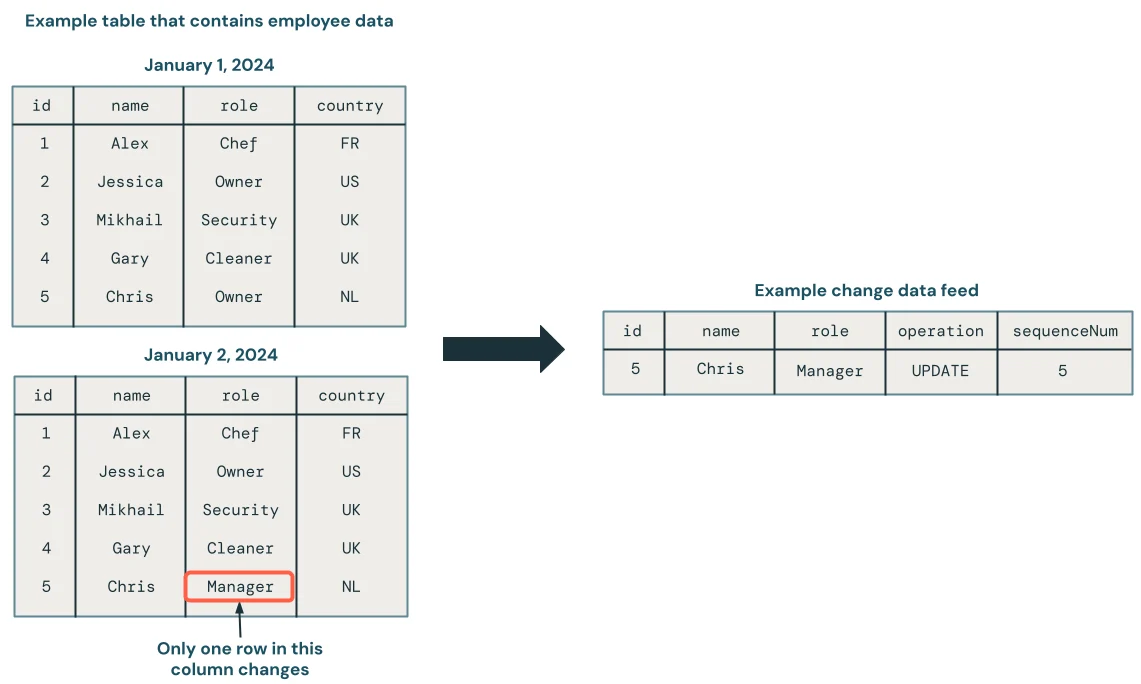
Temporal designs preserve how a row changed over time, not only its latest value. The CDC example makes the change record tangible; the diagrams below compare history-table design choices.
Version the business entity
- 1Stable business keyIdentifies the entity
- 2Active versionHolds current attributes
- 3Change arrivesClose the current interval
- 4New versionInsert with a new start time
A temporal table stores multiple business-valid versions of the same entity.
Model validity explicitly
Historical version
- start_at
- Set
- end_at
- Set
- Meaning
- No longer active
Current version
- start_at
- Set
- end_at
- NULL
- Meaning
- Active now
Effective start and end values make point-in-time queries possible.
Do not confuse with Delta time travel
Temporal modeling stores business history as rows. Delta time travel reconstructs an earlier physical table version. They answer different questions.
Key points
- Business key: Identifies the entity across versions
- Effective start: Marks when a version becomes valid
- Effective end: Marks when a version stops being valid
- Current flag: Optional shortcut for the active version
Exam trap
Delta time travel shows table versions; it is not the same as modeling business-valid history.
Sources · 2 Microsoft Learn pages Show ▾
Checked on October 4, 2026. Report a problem
Go deeper on Microsoft Learn
Checked against Microsoft Learn on October 4, 2026. Report a problem with this card