DP-750 · 3.3.7 · Prepare and process data
Load table changes
Load data by using merge, insert, and append operations
Use MERGE for matched updates and inserts, INSERT for explicit new rows, and append writes for additive DataFrame loads.
See a changed row before choosing the write pattern
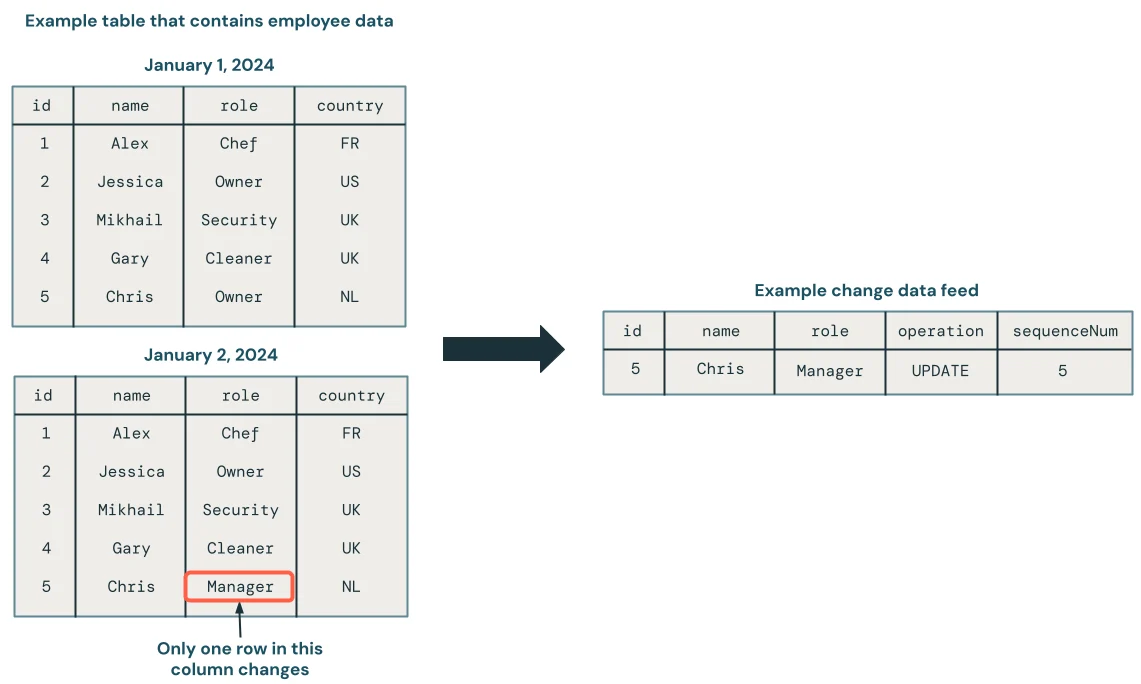
A changed source row can require an update, insert, or append depending on the target contract. The CDC record makes that distinction concrete; the diagrams below map it to MERGE and append behavior.
Choose the write by target behavior
- Update matches and add new recordsMERGE INTO
- Add SQL query resultsINSERT INTO
- Add DataFrame rows onlyAppend
MERGE is for conditional changes against an existing Delta target. INSERT and append are simpler when every incoming row should be added.
Reliable MERGE needs a reliable key
- 1Source changesIncoming records
- 2DeduplicateOne logical instruction per key
- 3Match conditionIdentify target business row
- 4Update or insertApply deterministic action
Multiple source rows matching the same target can make the result ambiguous.
Do not MERGE by habit
If data is immutable and purely additive, INSERT or append avoids unnecessary matching work.
Key points
- MERGE: Upserts matched and unmatched source records
- INSERT: Adds rows with SQL semantics
- Append: Adds DataFrame rows without replacing target data
- Keys: MERGE conditions must identify intended matches correctly
Exam trap
A bad MERGE condition can update the wrong rows or create duplicate business records.
Sources · 2 Microsoft Learn pages Show ▾
Checked on October 4, 2026. Report a problem
Go deeper on Microsoft Learn
Checked against Microsoft Learn on October 4, 2026. Report a problem with this card