PL-300 · 3.1.5 · Visualize and analyze the data
Conditional formatting
Apply conditional formatting
maps values to colors, bars, icons, or links using gradients, rules, or field values.
Choose the formatting logic
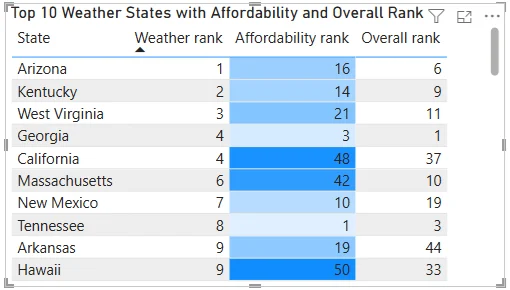
Use a gradient when formatting should vary continuously from low to high. Use rules when business thresholds define discrete states such as red, amber, and green.
Use more than background color
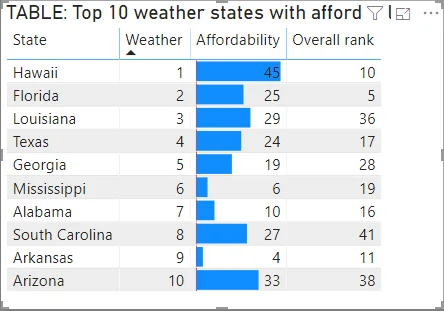
can also show , icons, font colors, or web URLs. lets a column or return a color name or hex code so can drive the appearance.
Understand threshold types
A value stored as 0.25 may represent 25%. If the rule should trigger at that actual value, use a Number threshold. Percent-of-range interprets the value relative to the data range instead.
Conditional formatting has higher priority than ordinary manual colors for the property it controls.
Exam clue: continuous scale = gradient; business bands = rules; DAX-driven color = field value.
Key points
- Gradient: maps values across a
- Rules: map ranges to chosen formatting
- Field value: supplies colors from data
- Overrides: beats manual colors
Click an underlined term for a one-line explanation, or see them all in the glossary .
Exam trap
For decimal percentages such as 0.25, use Number rules rather than Percent-of-range rules.
Sources · 2 Microsoft Learn pages Show ▾
Checked on October 4, 2026. Report a problem
Go deeper on Microsoft Learn
Checked against Microsoft Learn on October 4, 2026. Report a problem with this card