PL-300 · 3.3.5 · Visualize and analyze the data
Detect outliers and anomalies
Detect outliers and anomalies
Use techniques for unusual points and for unexpected values in time-series line charts.
Anomaly detection finds unexpected time-series values
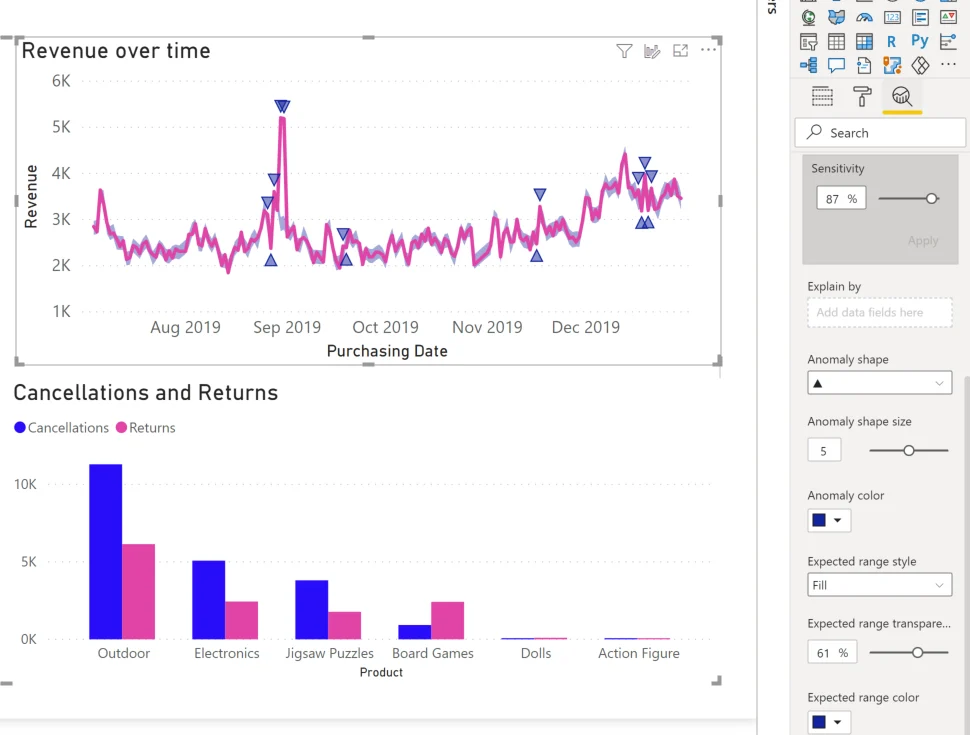
works on supported line-chart time series. Power BI calculates an and marks points that deviate from that range.
Sensitivity changes what is flagged
Higher sensitivity can surface more deviations; lower sensitivity focuses on stronger departures. The goal is not simply to find the largest value, but values that are unexpected relative to the time-series pattern.
Outlier and anomaly are not identical
A scatter chart can reveal an isolated numeric observation even without time. Anomaly detection specifically models a time-series pattern and can evaluate other fields to explain factors associated with a marked point.
Some line-chart features cannot be combined with anomaly detection, including certain scenarios.
Exam clue: unusual point in general = analysis; unexpected time-series point plus expected range = anomaly detection.
Key points
- Scatter chart: reveals isolated numeric observations
- flag: reacts to current filters
- : works on time-series line charts
- Sensitivity: controls how many deviations are flagged
Click an underlined term for a one-line explanation, or see them all in the glossary .
Exam trap
has visual limitations and cannot be combined with several line-chart features such as .
Sources · 3 Microsoft Learn pages Show ▾
- Identify outliers with Power BI visuals (Perform advanced analytics in Power BI)
- Anomaly detection tutorial for Power BI
- Use the Analytics pane in Power BI
Checked on October 4, 2026. Report a problem
Go deeper on Microsoft Learn
- Identify outliers with Power BI visuals (Perform advanced analytics in Power BI)
- Anomaly detection tutorial for Power BI
- Use the Analytics pane in Power BI
Checked against Microsoft Learn on October 4, 2026. Report a problem with this card