PL-300 · 4.2.6 · Manage and secure Power BI
Apply sensitivity labels
Apply sensitivity labels
classify Power BI content and can protect supported exports without replacing access controls.
Classify Power BI content
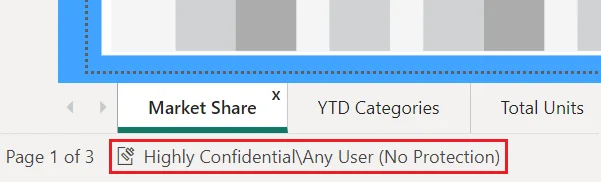
from Microsoft Purview classify content such as and reports. Labels communicate handling requirements and can add protection outside the Power BI service.
Protection can travel with exports
Supported exports such as Excel, PowerPoint, PDF, and downloaded PBIX files can inherit a label and its protection. Downstream Power BI content can also inherit labels in supported scenarios.
Labels do not replace permissions
A Confidential label does not revoke access from a user who already has permission to open the item in the service. , , semantic-model permissions, and still control service access.
A manually applied or more restrictive label can also affect inheritance behavior.
Exam clue: label = classification and portable protection; permission or RLS = access control.
Key points
- Purview labels: classify supported Power BI items
- Service access: labels do not replace permissions
- Exports: supported files can inherit label protection
- Inheritance: downstream content can receive labels
Click an underlined term for a one-line explanation, or see them all in the glossary .
Exam trap
A Confidential label does not stop an already authorized user from opening the item in the Power BI service.
Sources · 3 Microsoft Learn pages Show ▾
- How to apply sensitivity labels in Power BI
- Sensitivity labels in Power BI
- Sensitivity label downstream inheritance in Power BI
Checked on October 4, 2026. Report a problem
Go deeper on Microsoft Learn
- How to apply sensitivity labels in Power BI
- Sensitivity labels in Power BI
- Sensitivity label downstream inheritance in Power BI
Checked against Microsoft Learn on October 4, 2026. Report a problem with this card