PL-300 · 1.3.5 · Prepare the data
Semi-structured data to a table
Convert semi-structured data to a table
Use connectors for whole sources; use Parse then Expand for JSON or stored in a column.
Parse the text
Parse changes raw text into a structured value. It does not automatically expose every nested field as a normal column.
Expand the nested fields
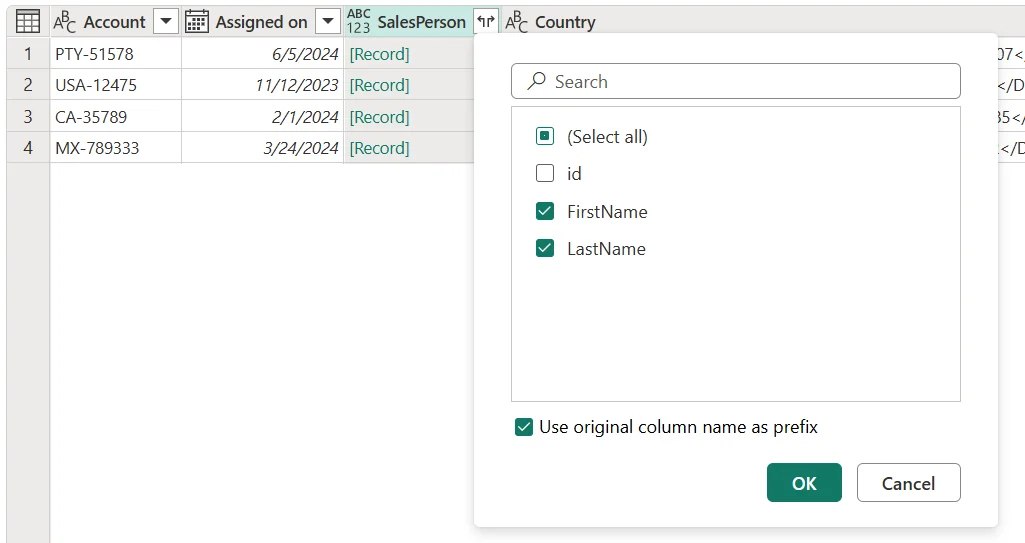
When the whole source is a file or API response, use the JSON connector. When JSON or lives inside a column, use Parse and then Expand.
Whole source or value inside a column?
A JSON file or API response can be opened through the JSON connector so discovers its structure. JSON or XML text that already sits inside a table column needs Parse first.
After parsing, expand the resulting Record or Table values until the fields you need become normal columns.
Exam clue: JSON text already inside a table column = Parse, then Expand.
Key points
- connector: automatically detects table structure
- Parse JSON: text becomes
- Parse : text becomes Table values
- Expand: exposes nested fields as columns
Click an underlined term for a one-line explanation, or see them all in the glossary .
Exam trap
Parse creates structured values, but fields remain nested until you expand the column.
Sources · 2 Microsoft Learn pages Show ▾
Checked on October 4, 2026. Report a problem
Go deeper on Microsoft Learn
Checked against Microsoft Learn on October 4, 2026. Report a problem with this card