PL-300 · 4.1.8 · Manage and secure Power BI
When a gateway is required
Identify when a gateway is required
Use a when the Power BI service cannot directly reach a source or required connector environment.
The gateway bridges cloud and private sources
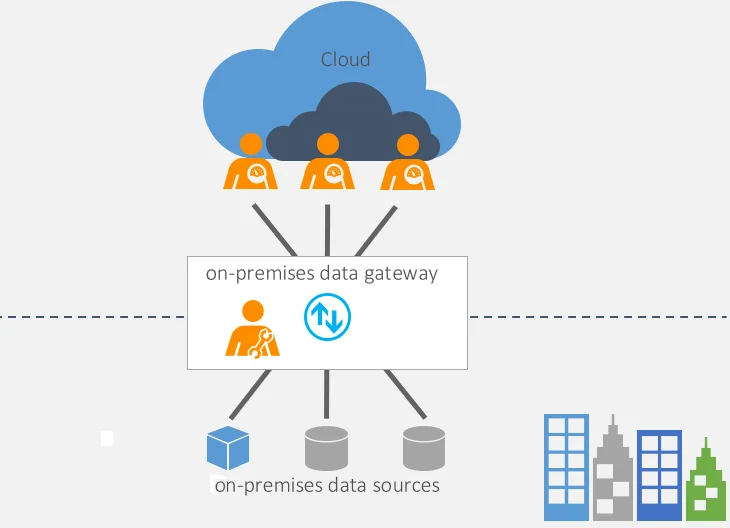
The Power BI service needs a when it cannot directly reach the data source. That commonly includes on-premises servers and sources inside private networks.
Standard mode supports shared enterprise scenarios and . is limited to one user’s Import refresh scenarios.
Decide from network reachability
If the Power BI service can reach the source directly, a gateway is often unnecessary. If the source is on-premises or inside a private network, a gateway provides the bridge.
Use standard mode for shared enterprise scenarios and DirectQuery. Personal mode is for one user's Import refresh scenarios and is not a shared gateway.
Exam clue: ask whether the Power BI service can reach the source directly.
Key points
- On-premises source: required
- Private network source: gateway required
- Direct cloud source: often no gateway needed
- Standard gateway: supports shared enterprise scenarios
Click an underlined term for a one-line explanation, or see them all in the glossary .
Exam trap
A cloud-hosted source can still require a when it sits inside a private network.
Sources · 3 Microsoft Learn pages Show ▾
- On-premises data gateways in Power BI
- Power BI implementation planning: Data gateways
- Use a Personal Gateway in Power BI
Checked on October 4, 2026. Report a problem
Go deeper on Microsoft Learn
- On-premises data gateways in Power BI
- Power BI implementation planning: Data gateways
- Use a Personal Gateway in Power BI
Checked against Microsoft Learn on October 4, 2026. Report a problem with this card