PL-300 · 3.2.1 · Visualize and analyze the data
Configure bookmarks
Configure bookmarks
save report state so readers can return to selected filters, visibility, page, and drill context.
Bookmark options define what is restored
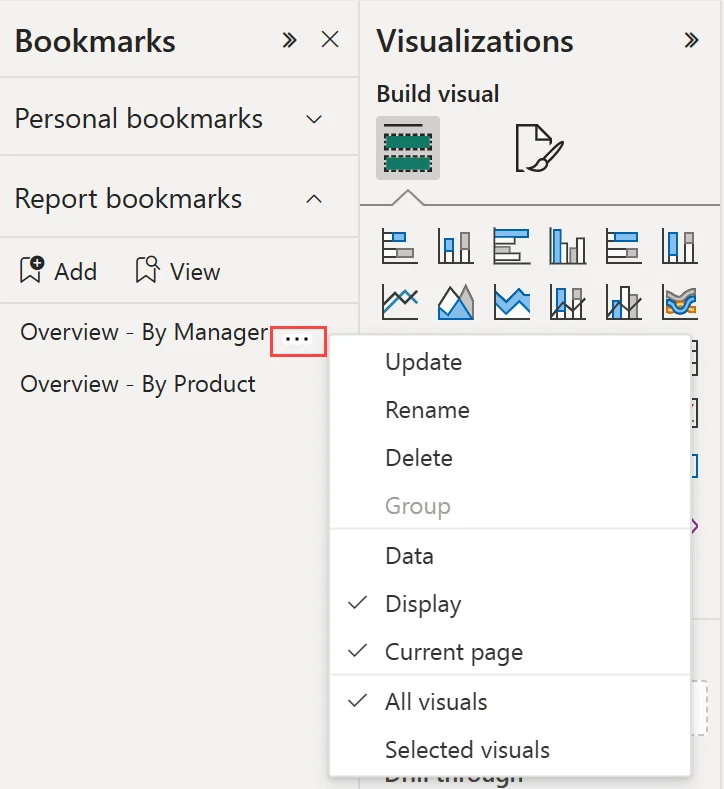
A saves report state. Data stores filters and selections. Display stores visibility and spotlight state. Current page stores navigation. Selected visuals limits the bookmark to part of the page.
Choose the scope deliberately
Use All visuals when the bookmark should restore the whole page. Use Selected visuals when a bookmark should change only part of the experience, such as swapping one visual panel while leaving slicers untouched.
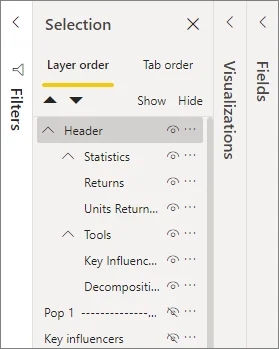
Bookmarks pair especially well with the because Display can store which objects are visible.
Update after changing the state
Bookmarks do not learn later edits automatically. Change the page to the desired state, then choose Update on the bookmark.
Exam clue: saved state changed later = update the bookmark; do not recreate it unnecessarily.
Key points
- Data: stores filters and state
- Display: stores visibility and spotlight state
- Selected visuals: limits scope
- Update: resaves changes to the bookmark
Click an underlined term for a one-line explanation, or see them all in the glossary .
Exam trap
Changing page state does not update a automatically; select Update to store the new state.
Sources · 1 Microsoft Learn page Show ▾
Checked on October 4, 2026. Report a problem
Go deeper on Microsoft Learn
Checked against Microsoft Learn on October 4, 2026. Report a problem with this card