PL-300 · 3.1.1 · Visualize and analyze the data
Selecting a visual type
Select an appropriate visual
Choose visuals by the reader's task: comparison, trend, composition, , , or exact values.
Start from the question
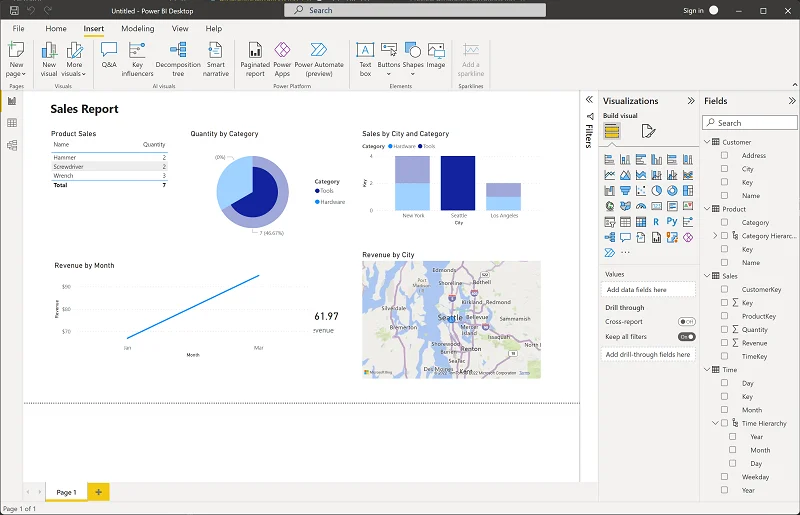
Different visuals encode different questions. The chart gallery is not the starting point: first decide whether the reader needs comparison, trend, composition, , geography, one headline number, or exact detail.
Use a task-to-visual shortcut
| Reader needs to | Start with |
|---|---|
| Compare categories | Bar or column chart |
| See change over time | Line chart |
| Read exact values | Table or matrix |
| See one headline result | Card or |
| Explore geographic patterns | Map visual |
Treat this as a starting point, then check how many categories, , and dimensions the visual must carry.
Exam clue: map the analytical task to the visual family before thinking about formatting.
Key points
- Bar or column: compare categories
- Line: show trends over continuous axes
- Pie or : show simple part-to-whole
- Table or matrix: show exact values
Click an underlined term for a one-line explanation, or see them all in the glossary .
Exam trap
Changing a report visual does not update an already pinned .
Sources · 3 Microsoft Learn pages Show ▾
- Overview of visualizations in Power BI
- Customize the Visualizations pane in Power BI Desktop and the Power BI service
- Tips and tricks for formatting in reports
Checked on October 4, 2026. Report a problem
Go deeper on Microsoft Learn
- Overview of visualizations in Power BI
- Customize the Visualizations pane in Power BI Desktop and the Power BI service
- Tips and tricks for formatting in reports
Checked against Microsoft Learn on October 4, 2026. Report a problem with this card