PL-300 · 4.2.4 · Manage and secure Power BI
Implement row-level security roles
Implement row-level security roles
uses role filters to restrict model rows for Viewer users.
Define, publish, assign, test
filters rows in the . Static rules use fixed conditions; can match the signed-in identity, commonly through ().
Test the published role
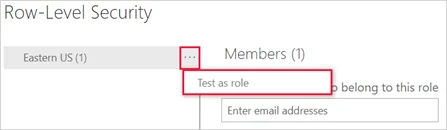
RLS restricts Viewers. Admins, Members, and Contributors are not constrained by those role filters.
Static or dynamic RLS?
Use a static role when the rule is fixed, such as Region = "West". Use dynamic RLS when one reusable role should return different rows for different signed-in users, typically by matching USERPRINCIPALNAME() to a user mapping table.
After publishing, membership is assigned in the service and the result should be tested as the role.
Exam clue: remember both the sequence and the Viewer requirement.
Key points
- Role filter: expression returns allowed rows
- Static : compares columns with fixed values
- : can use ()
- Service: assigns users to published roles
Click an underlined term for a one-line explanation, or see them all in the glossary .
Exam trap
applies to Viewers; Admins, Members, and Contributors are not restricted by those role filters.
Sources · 1 Microsoft Learn page Show ▾
Checked on October 4, 2026. Report a problem
Go deeper on Microsoft Learn
Checked against Microsoft Learn on October 4, 2026. Report a problem with this card