PL-300 · 4.2.5 · Manage and secure Power BI
Configure RLS group membership
Configure row-level security group membership
Assign users or supported groups to published in the Power BI service.
Add members to the published role
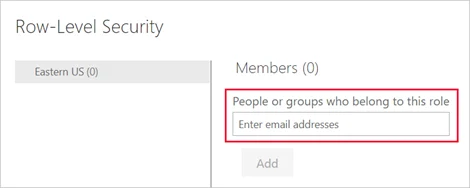
After are defined and published, assign users or supported groups on the 's Security page.
Use supported group types
, mail-enabled security groups, and distribution groups can be used for role membership. and service principals are not valid RLS role members.
Multiple roles combine access
A user can belong to more than one RLS role. The rows allowed by those roles combine, so adding another role can broaden what the user sees rather than making the result more restrictive.
Always test the published role with the intended membership before relying on it.
Exam clue: group support and group support are not the same.
Key points
- Security page: assigns members to roles
- Supported groups: security, mail-enabled, and distribution groups
- Unsupported: and service principals
- Multiple roles: permissions combine across their allowed rows
Click an underlined term for a one-line explanation, or see them all in the glossary .
Exam trap
can hold but cannot be used as members.
Sources · 2 Microsoft Learn pages Show ▾
Checked on October 4, 2026. Report a problem
Go deeper on Microsoft Learn
Checked against Microsoft Learn on October 4, 2026. Report a problem with this card