PL-300 · 1.3.4 · Prepare the data
Pivot, unpivot and transpose
Pivot, unpivot, and transpose data
creates columns; creates attribute-value rows; rotates the whole table.
Pivot makes columns
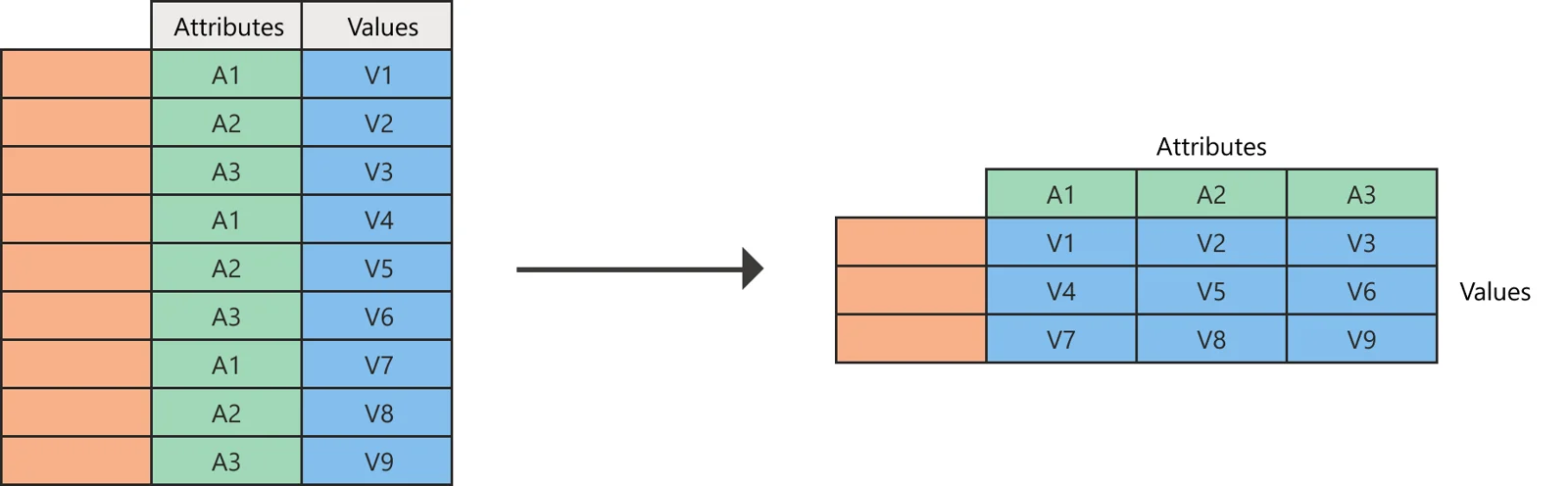
turns values from one column into new column headers. Use it when categories should become a wider matrix. If several source rows land on the same intersection, choose an aggregation.
Unpivot makes rows
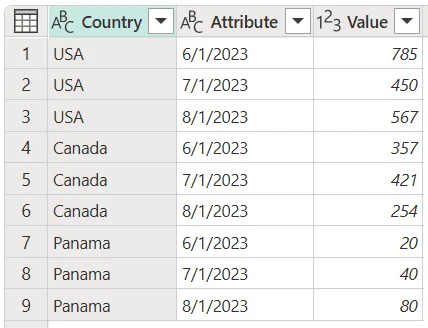
folds several columns into Attribute and Value rows, turning a wide table into a longer analytical shape.
Selected columns or Other Columns?
Unpivot Other Columns protects the identifier columns you select and automatically unpivots new columns that appear later. Unpivoting only explicitly selected columns does not automatically include future columns.
is different again: it rotates the whole table so rows become columns and columns become rows.
Exam clue: wider = pivot; longer = unpivot; whole table rotated = transpose.
Key points
- : unique values become new columns
- Don't aggregate: requires one value per intersection
- : columns become Attribute and Value rows
- : rows and columns swap
Click an underlined term for a one-line explanation, or see them all in the glossary .
Exam trap
Other Columns automatically includes new source columns; unpivoting selected columns does not.
Sources · 3 Microsoft Learn pages Show ▾
Checked on October 4, 2026. Report a problem
Go deeper on Microsoft Learn
Checked against Microsoft Learn on October 4, 2026. Report a problem with this card