PL-300 · 1.3.10 · Prepare the data
Configure data loading for queries
Configure data loading for queries
Enable Load controls model output; Include in Report Refresh controls later refreshes.
Query output versus refresh
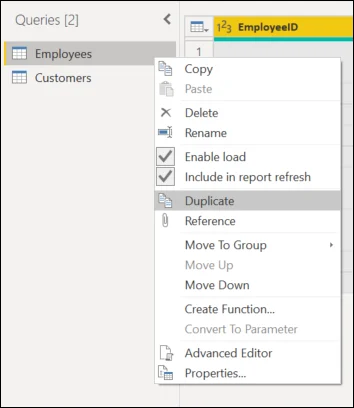
The query context menu is where query-level behaviors such as Enable Load and Include in Report Refresh are controlled. A can remain available to other queries without becoming a model table.
Build a staging layer deliberately
A staging or helper query can clean or combine data for downstream queries while Enable Load is off, so it does not become another model table. Downstream queries can still depend on and execute its steps.
Treat model output and refresh participation as separate settings: one controls what lands in the model, the other controls later refresh behavior.
Exam clue: helper query should exist but not appear in the model = disable Enable Load.
Key points
- Enable Load: controls whether output enters the model
- : usually disable Enable Load
- Report refresh: controls later refresh participation
- Dependencies: disabled load does not stop query execution
Click an underlined term for a one-line explanation, or see them all in the glossary .
Exam trap
Disabling Enable Load hides the result from the model, but dependent queries can still execute its steps.
Sources · 2 Microsoft Learn pages Show ▾
Checked on October 4, 2026. Report a problem
Go deeper on Microsoft Learn
Checked against Microsoft Learn on October 4, 2026. Report a problem with this card