PL-300 · 3.1.6 · Visualize and analyze the data
Slicing and filtering
Apply slicing and filtering
Filters work at visual, page, or report scope; expose filtering controls directly on the canvas.
Slicer puts filtering on the canvas
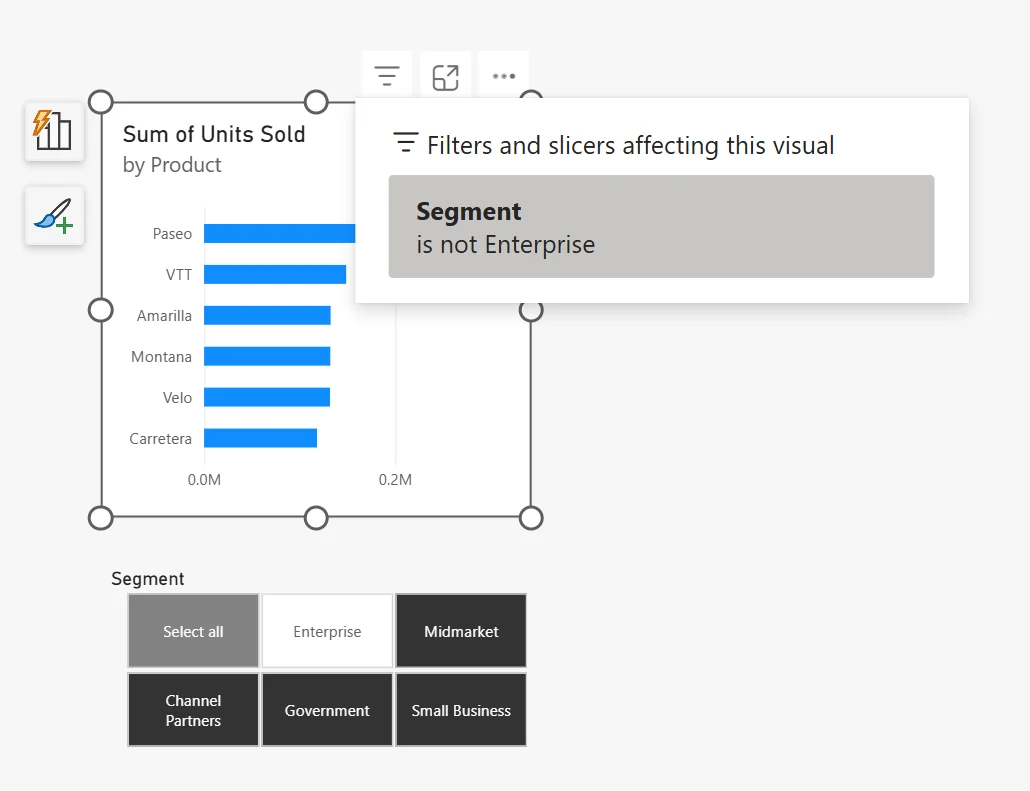
A is a reader-facing control. It makes the current selection visible and easy to change, which is useful for common choices such as date, region, product, or segment.
Choose the filter scope
| Scope | Affects |
|---|---|
| Visual | One visual |
| Page | Every visual on one page |
| Report | Every page |
| Visuals affected by that slicer's interactions |
Use the narrowest scope that matches the requirement.
Hide, lock, or expose
A hidden filter still applies but disappears from the . A locked filter stays visible but readers cannot change it. A slicer is appropriate when readers should actively control the selection.
A hidden filter can therefore explain why data appears restricted even when no visible filter card exists.
Exam clue: ask who controls the filter and how broadly it should apply.
Key points
- Filter scope: visual, page, or all pages
- Lock: visible but unchangeable filter
- Hide: filter still applies but disappears
- : reader-facing filter control
Click an underlined term for a one-line explanation, or see them all in the glossary .
Exam trap
Hidden filters still affect the data; hiding only removes the filter card from view.
Sources · 4 Microsoft Learn pages Show ▾
- Add a filter to a report in Power BI
- Format filters in Power BI reports
- Overview of slicers in Power BI
- Slicer visual in Power BI
Checked on October 4, 2026. Report a problem
Go deeper on Microsoft Learn
- Add a filter to a report in Power BI
- Format filters in Power BI reports
- Overview of slicers in Power BI
- Slicer visual in Power BI
Checked against Microsoft Learn on October 4, 2026. Report a problem with this card