PL-300 · 1.3.2 · Prepare the data
Create and transform columns
Create and transform columns
Add Column creates new values; Transform changes existing columns in place.
Add a new calculated column
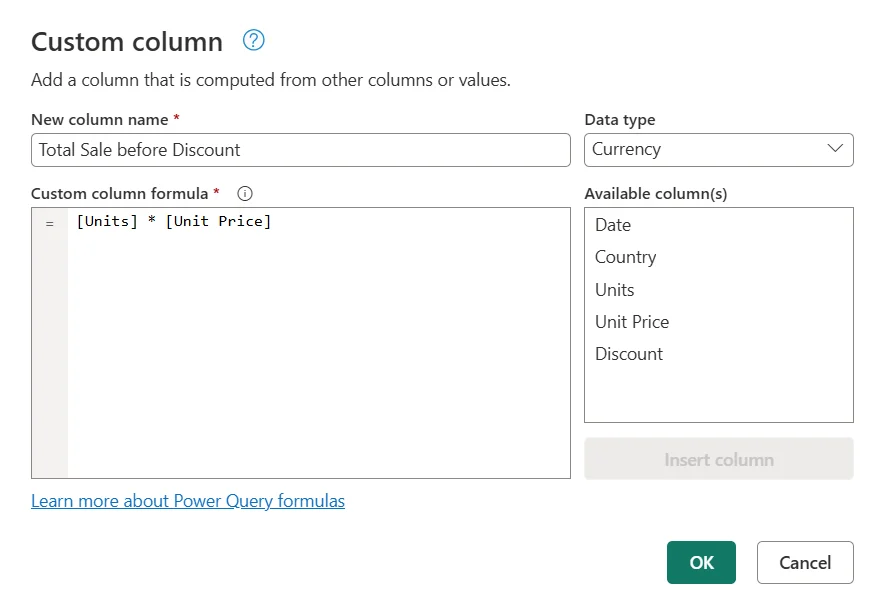
Use Add Column when the original field should remain and you need a new value beside it. A uses and can reference other columns.
Transform an existing column
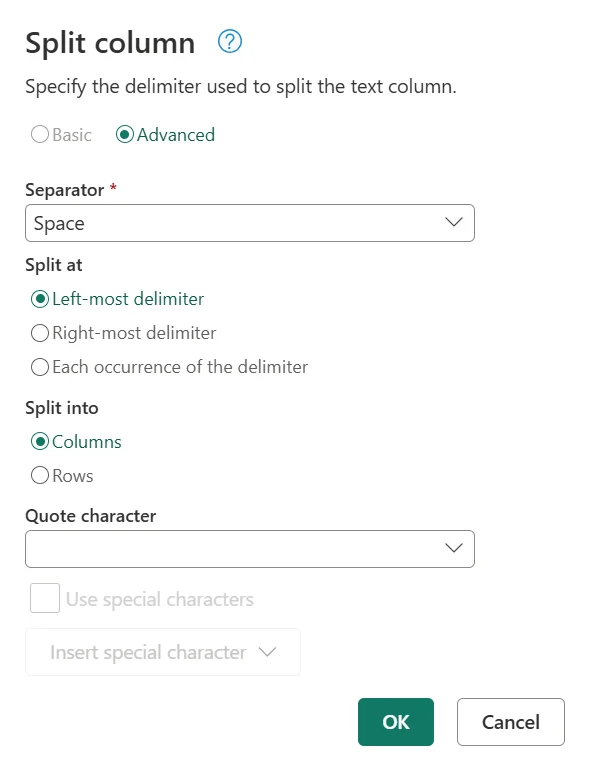
Use Transform when the selected field itself should change. Operations such as Replace Values, Format, Extract, or Split can reshape the existing data.
Preserve or replace?
A Split Column operation typically replaces the original column with the split result. Duplicate the source column first when the original value must remain available.
The same requirement often determines the ribbon choice: keep the original + derive something new means Add Column; change the original means Transform.
Exam clue: preserve and derive = Add Column; reshape in place = Transform.
Key points
- Add Column: preserves source columns
- Transform: changes an existing column
- : uses M expressions
- Split column: can create columns or rows
Click an underlined term for a one-line explanation, or see them all in the glossary .
Exam trap
Split replaces the original column. Duplicate it first if you must keep the original.
Sources · 2 Microsoft Learn pages Show ▾
Checked on October 4, 2026. Report a problem
Go deeper on Microsoft Learn
Checked against Microsoft Learn on October 4, 2026. Report a problem with this card