PL-300 · 2.2.8 · Model the data
Calculation groups
Create calculation groups
apply reusable to , reducing duplicate definitions.
Reuse one calculation pattern
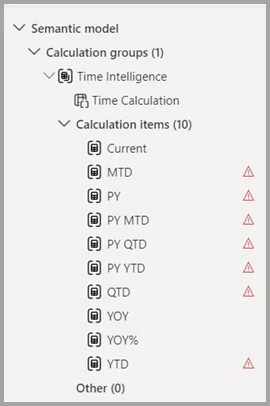
A stores reusable such as Current, Prior Year, and YoY%. () represents whichever the item is applied to.
Avoid repeated measure variants
Without a calculation group, Revenue PY, Cost PY, Margin PY, and many similar can repeat nearly the same . One calculation item can apply the prior-year logic to all of them.
Understand scope and precedence
Calculation items work with explicit measures, not implicit visual aggregations. When multiple calculation groups apply, precedence determines which transformation is evaluated first.
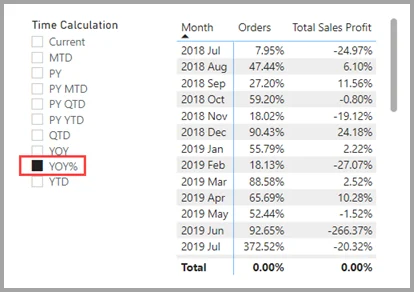
The calculation group's column is used in a report to select the active calculation item.
Exam clue: many repeated variants of explicit measures point to a calculation group.
Key points
- : reusable transformation
- : represents the current
- Group column: selects the active calculation item
- Precedence: orders multiple
Click an underlined term for a one-line explanation, or see them all in the glossary .
Exam trap
do not apply to implicit aggregations created by dragging numeric columns directly onto visuals.
Sources · 1 Microsoft Learn page Show ▾
Checked on October 4, 2026. Report a problem
Go deeper on Microsoft Learn
Checked against Microsoft Learn on October 4, 2026. Report a problem with this card