PL-300 · 1.2.1 · Prepare the data
Data profiling
Evaluate data, including data statistics and column properties
Profiling reveals validity, distribution, and statistics before cleaning data.
Turn profiling on
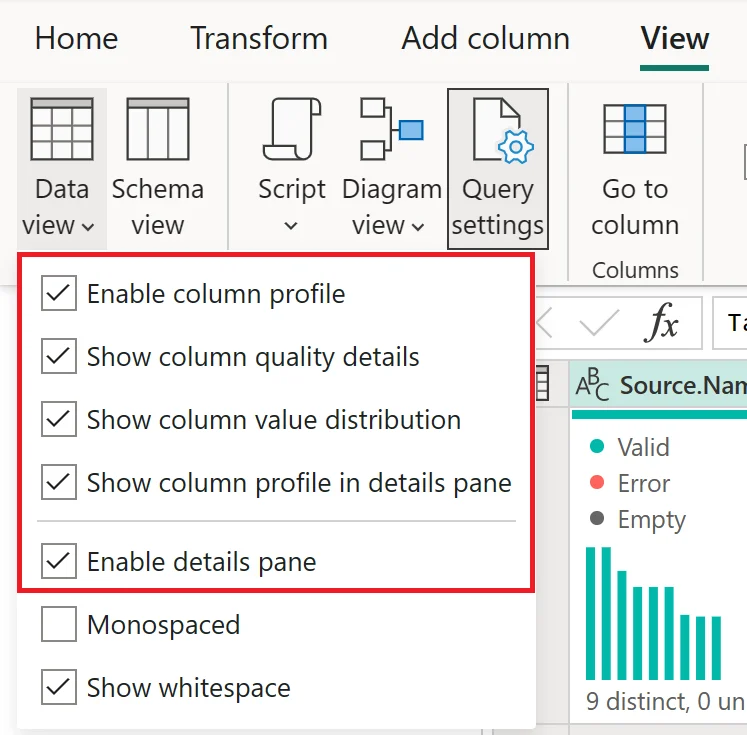
has three complementary profiling views.
Know what each view answers
| View | Best question |
|---|---|
| Which values are valid, error, or empty? | |
| How often do values occur? | |
| What are the detailed statistics for one column? |
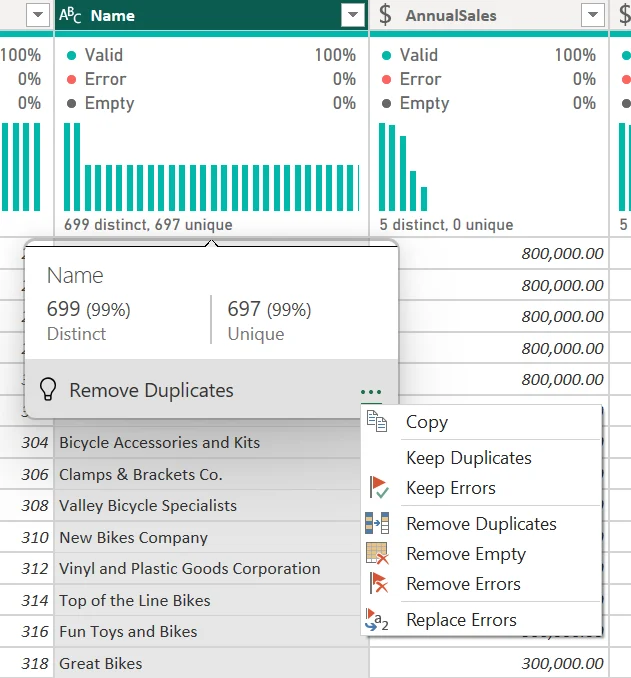
Distinct counts different values. Unique counts values that occur exactly once.
Check the profiling scope
By default, profiling uses the first 1,000 rows. Switch to the full data set when the decision depends on complete statistics, because a problem outside the sample can otherwise remain hidden.
Exam clue: quality = validity, distribution = frequency, profile = detailed statistics.
Key points
- : valid, error, and empty values
- : frequency, ,
- : detailed statistics for one column
- Default scope: first 1,000 rows
Click an underlined term for a one-line explanation, or see them all in the glossary .
Exam trap
Distinct counts different values. Unique counts only values appearing exactly once.
Sources · 2 Microsoft Learn pages Show ▾
Checked on October 4, 2026. Report a problem
Go deeper on Microsoft Learn
Checked against Microsoft Learn on October 4, 2026. Report a problem with this card