PL-300 · 1.1.3 · Prepare the data
Choose a storage mode
Choose between DirectLake, DirectQuery, and Import
Choose Import for speed, for source freshness, and for data.
Where does the data live?
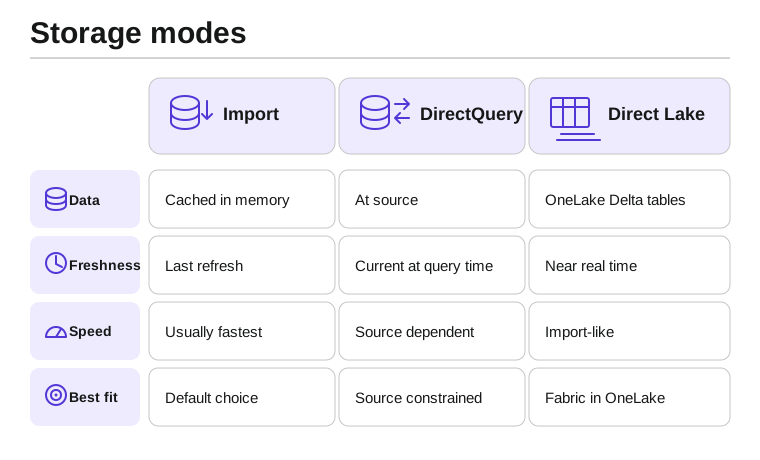
determines where table data is read from when a report runs. Import keeps a cached copy, sends queries to the source, and reads Fabric data from .
Choose by constraint
| Mode | Reads from | Strongest reason to choose it |
|---|---|---|
| Import | In-memory cached model | Fast interactive analysis |
| Source at query time | Data must stay at the source or stay very current | |
| Delta data | Fabric data with Direct Lake architecture |
Do not choose by freshness alone. Source location and model architecture also matter.
Exam clue: start with Import unless freshness, source location, or architecture requires another mode.
Key points
- Import: cached snapshot, fastest interactive queries
- : queries the source at report time
- : reads data directly
- Default choice: Import unless requirements force otherwise
Click an underlined term for a one-line explanation, or see them all in the glossary .
Exam trap
is not . It reads data instead of sending report queries to an external source.
Sources · 2 Microsoft Learn pages Show ▾
Checked on October 4, 2026. Report a problem
Go deeper on Microsoft Learn
Checked against Microsoft Learn on October 4, 2026. Report a problem with this card