PL-300 · 3.2.8 · Visualize and analyze the data
Drillthrough navigation
Configure drillthrough navigation, including pages, filters, and buttons
opens a detail page filtered to the selected value from a source visual.
Open a filtered detail page
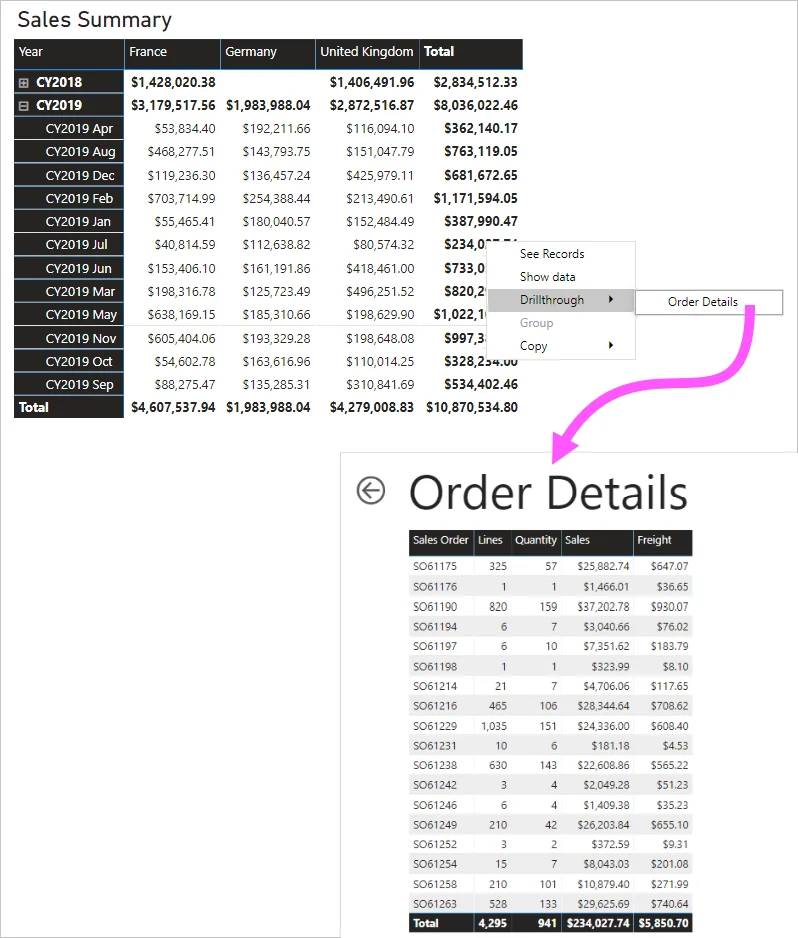
answers “show me more about this item.” A selected customer, product, or region can open a detail page already filtered to that value.
Configure the target and source
Add the required field to the target page's . The source visual must contain a compatible field so Power BI has context to pass. A button can also trigger drillthrough when a valid selection exists.
Drillthrough is not drill mode
Drill mode moves up or down a hierarchy inside the same visual. Drillthrough opens another page. Normal page navigation also opens another page, but does not carry the selected .
can continue into another report when the fields and service configuration are compatible.
Exam clue: same visual hierarchy = drill; new filtered page = drillthrough.
Key points
- Target page: add a field
- Source visual: must contain the drillthrough field
- Button: can trigger drillthrough for a selection
- Cross-report: requires compatible fields and configuration
Click an underlined term for a one-line explanation, or see them all in the glossary .
Exam trap
Drill mode navigates hierarchy levels inside a visual; opens another filtered page.
Sources · 2 Microsoft Learn pages Show ▾
Checked on October 4, 2026. Report a problem
Go deeper on Microsoft Learn
Checked against Microsoft Learn on October 4, 2026. Report a problem with this card