PL-300 · 3.2.11 · Visualize and analyze the data
Personalize visuals
Enable personalization in a report, including personalized visuals
lets readers change visual fields, aggregation, and type without editing the report itself.
Readers can change a visual without editing the report
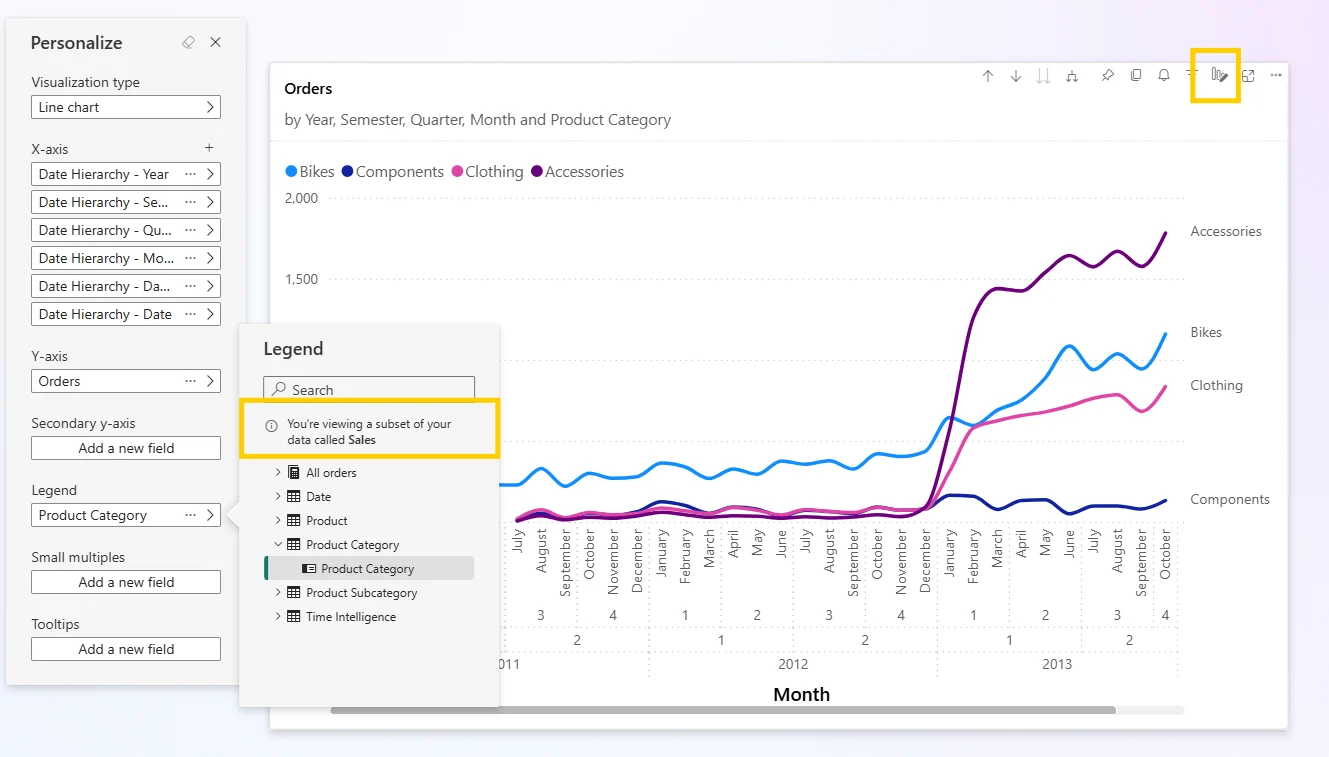
lets readers change a visual's type, fields, legend, and aggregation while staying in Reading view. The report author's published design is not overwritten.
Control where personalization is allowed
The author can enable personalization at report, page, or visual level. That lets a report offer flexibility without making every visual customizable.
Limit choices with perspectives
A model can narrow the fields offered in the personalization experience. A perspective improves usability, but it is not security and does not hide data from a user who otherwise has access.
Readers can preserve their customized state with a .
Exam clue: reader wants a different chart without edit permission = Personalize visuals; restrict rows = security, not a perspective.
Key points
- Enable: report, page, or visual level
- Reading view: readers can personalize without edit permission
- : preserves reader changes
- : limits fields offered for personalization
Click an underlined term for a one-line explanation, or see them all in the glossary .
Exam trap
Reader personalization is lost unless saved in a .
Sources · 2 Microsoft Learn pages Show ▾
Checked on October 4, 2026. Report a problem
Go deeper on Microsoft Learn
Checked against Microsoft Learn on October 4, 2026. Report a problem with this card