PL-300 · 1.3.9 · Prepare the data
Keys for relationships
Identify and create appropriate keys for relationships
require uniqueness on at least one side; create a when needed.
Create the relationship
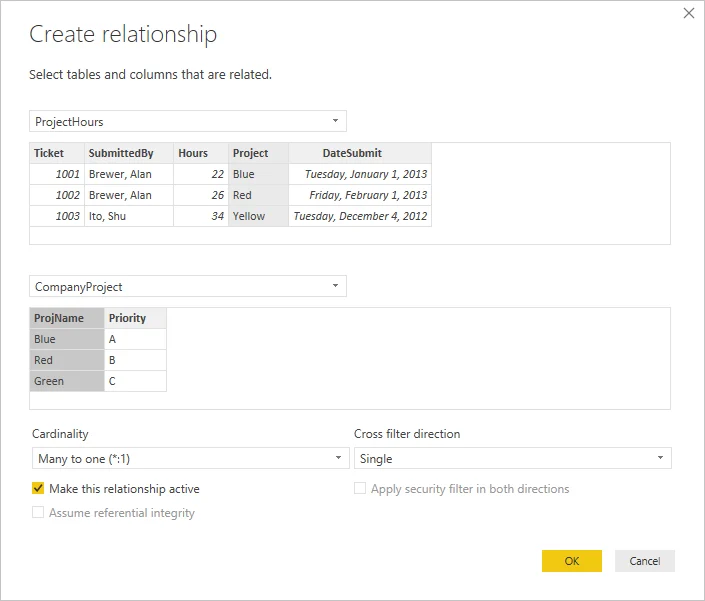
A connects one column in each table. In the common many-to-one pattern, the lookup or dimension side must contain unique values while the fact side may repeat them.
If neither side is unique
Deleting duplicate fact rows is not a safe way to manufacture uniqueness.
Test the candidate key
The column on the one side must identify each lookup entity once. If both candidate columns contain repeated business values, the model does not yet have a clean one-side key.
Create or derive a suitable key instead of deleting valid fact rows merely to make a relationship possible.
Exam clue: duplicates on both candidate key columns point to fixing or creating a key before the relationship.
Key points
- One side: must contain unique values
- Autodetect: uses confident column matches
- Manual : choose matching columns yourself
- : adds uniqueness without deleting rows
Click an underlined term for a one-line explanation, or see them all in the glossary .
Exam trap
Removing duplicates can discard valid data. Create a instead when no exists.
Sources · 1 Microsoft Learn page Show ▾
Checked on October 4, 2026. Report a problem
Go deeper on Microsoft Learn
Checked against Microsoft Learn on October 4, 2026. Report a problem with this card