PL-300 · 2.2.6 · Model the data
Quick measures
Create a measure by using quick measures
generate common calculations through a guided dialog and create normal reusable .
Choose a calculation in the dialog
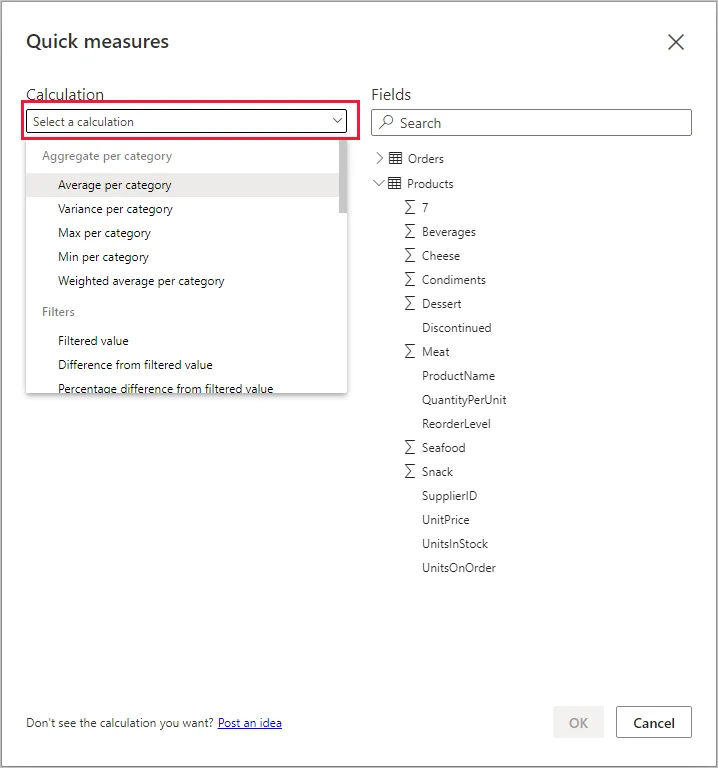
provide guided calculation patterns. Choose the pattern, then supply the required fields instead of writing the from scratch.
Power BI creates normal DAX
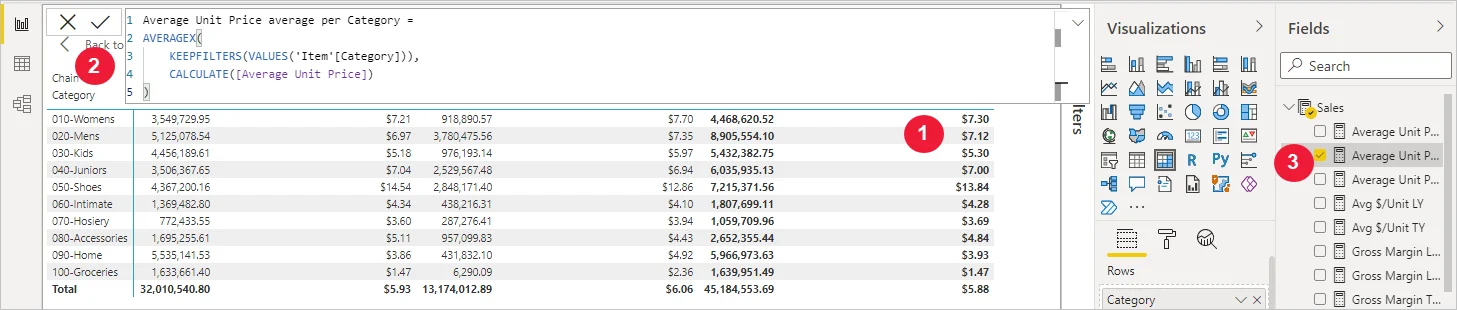
The result is an ordinary stored in the model. Its generated DAX is visible, editable, and reusable across visuals.
Use quick measures as a starting point
Quick measures are useful for common patterns and for learning how a calculation is written. They do not create a special runtime object and they do not remove prerequisites such as a valid for time-intelligence patterns.
After creation, maintain and test the like any other DAX measure.
Exam clue: guided dialog that outputs editable reusable DAX = quick measure.
Key points
- Dialog: choose a calculation and required fields
- Generated : visible and editable afterward
- Result: regular stored
- : needs a proper
Click an underlined term for a one-line explanation, or see them all in the glossary .
Exam trap
A is not temporary; after creation it behaves like any other .
Sources · 1 Microsoft Learn page Show ▾
Checked on October 4, 2026. Report a problem
Go deeper on Microsoft Learn
Checked against Microsoft Learn on October 4, 2026. Report a problem with this card