PL-300 · 3.2.12 · Visualize and analyze the data
Accessible reports
Design and configure Power BI reports for accessibility
Accessible reports combine , logical , sufficient contrast, and non-color cues.
Do not encode meaning with color alone
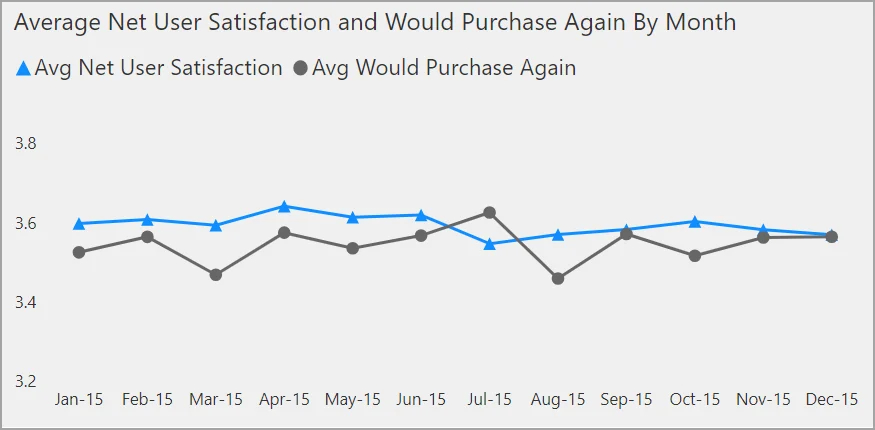
Use labels, markers, shapes, and sufficient contrast so readers do not need color perception alone to understand a visual.
Make keyboard navigation logical
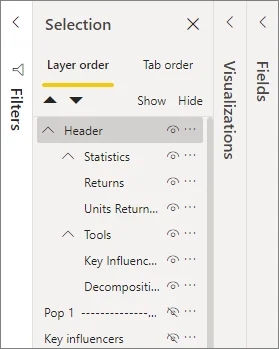
should follow the same logical reading sequence as the page. Decorative objects should not interrupt keyboard navigation; meaningful visuals and controls should be reachable in a useful order.
Give screen readers the missing context
Add concise to meaningful visuals and objects. Do not hide essential information only in tooltips because keyboard or screen-reader users may not receive it reliably.
Accessibility is a report-design concern across understanding, navigation, and interaction, not only a color-contrast check.
Exam clue: accessible design combines alt text, tab order, contrast, and non-color cues.
Key points
- : describe meaningful visuals and objects
- : follow a logical reading sequence
- Color: never be the only signal
- Tooltips: do not contain essential information only
Click an underlined term for a one-line explanation, or see them all in the glossary .
Exam trap
Decorative objects should leave the ; meaningful objects need accessible descriptions and navigation.
Sources · 1 Microsoft Learn page Show ▾
Checked on October 4, 2026. Report a problem
Go deeper on Microsoft Learn
Checked against Microsoft Learn on October 4, 2026. Report a problem with this card