PL-300 · 3.3.2 · Visualize and analyze the data
Grouping, binning and clustering
Use grouping, binning, and clustering
Group manually combines categories, create equal ranges, and automatically finds similar observations.
Group is manual
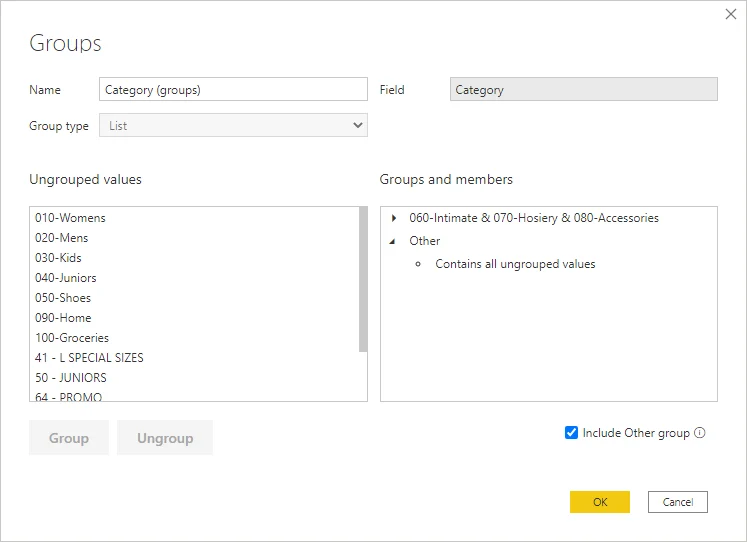
Grouping combines selected category members into a business-defined label, such as combining several products into one portfolio group.
Binning creates ranges
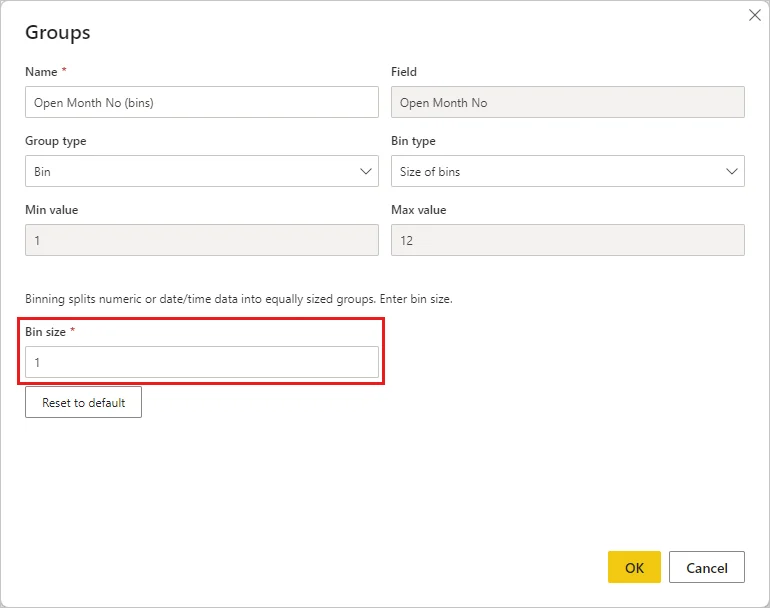
divides numeric or date values into ranges. Choose it when raw continuous values need meaningful buckets such as age bands or ten-unit intervals.
Clustering discovers similarity
is different from both: Power BI analyzes the observations and creates groups based on similarity. The user does not manually define each membership.
| Need | Feature |
|---|---|
| Combine chosen categories | Group |
| Create equal value ranges | |
| Discover similar observations |
Exam clue: selected categories = group; equal ranges = bins; discovered segments = clusters.
Key points
- Group: manually combine selected categories
- : split numeric or date columns into ranges
- : automatically groups similar data points
- New values: can fall into an Other group
Click an underlined term for a one-line explanation, or see them all in the glossary .
Exam trap
Groups are manually defined; are discovered automatically from similarity in the data.
Sources · 3 Microsoft Learn pages Show ▾
- Use grouping and binning in Power BI Desktop
- Group and bin data for analysis (Perform advanced analytics in Power BI)
- Apply clustering techniques (Perform advanced analytics in Power BI)
Checked on October 4, 2026. Report a problem
Go deeper on Microsoft Learn
- Use grouping and binning in Power BI Desktop
- Group and bin data for analysis (Perform advanced analytics in Power BI)
- Apply clustering techniques (Perform advanced analytics in Power BI)
Checked against Microsoft Learn on October 4, 2026. Report a problem with this card