PL-300 · 3.2.5 · Visualize and analyze the data
Sort visuals
Apply sorting to visuals
Sort visuals interactively, or define model-level when business order differs from alphabetical order.
Sort inside the visual
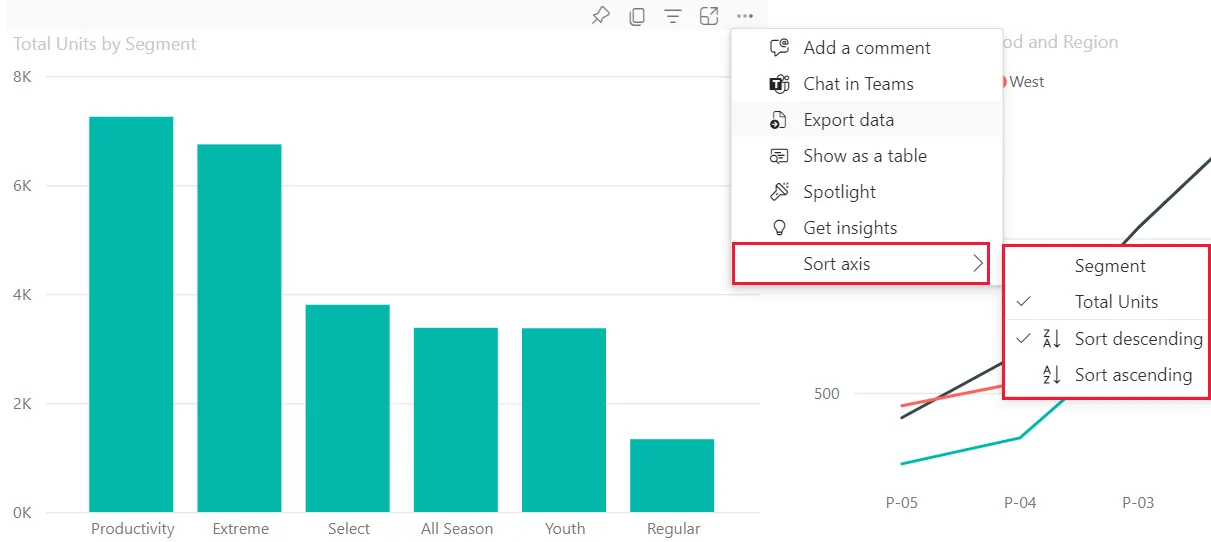
A visual can sort ascending or descending by one of its available fields. Tables and matrices can use multiple sort levels, with the first selected column having the highest priority.
Use Sort by Column for business order
Alphabetical sorting cannot fix month names, weekday names, or other business sequences. belongs to the model and tells Power BI to order one displayed field by another field at the same .
For example, Month Name can sort by Month Number.
Know which sort survives where
A reader can change a visual's sort order interactively. can capture that visual state. Sort by Column is broader because every visual using that model field inherits the model-defined order.
Exam clue: local ascending/descending = visual sort; reusable business sequence = Sort by Column.
Key points
- Visual menu: choose field and sort direction
- Table: Shift-select headers for multi-column sorting
- : fixes reusable model-level ordering
- : capture current visual sort state
Click an underlined term for a one-line explanation, or see them all in the glossary .
Exam trap
Ascending versus descending cannot fix business order such as month names; use instead.
Sources · 4 Microsoft Learn pages Show ▾
- Change how a chart is sorted in a report
- Sort one column by another column in Power BI
- Create report bookmarks in Power BI
- Design Power BI reports for accessibility
Checked on October 4, 2026. Report a problem
Go deeper on Microsoft Learn
- Change how a chart is sorted in a report
- Sort one column by another column in Power BI
- Create report bookmarks in Power BI
- Design Power BI reports for accessibility
Checked against Microsoft Learn on October 4, 2026. Report a problem with this card