PL-300 · 3.1.9 · Visualize and analyze the data
Configuring the report page
Configure the report page
control page dimensions; controls only how that page fits the window.
Page view changes only the editor view
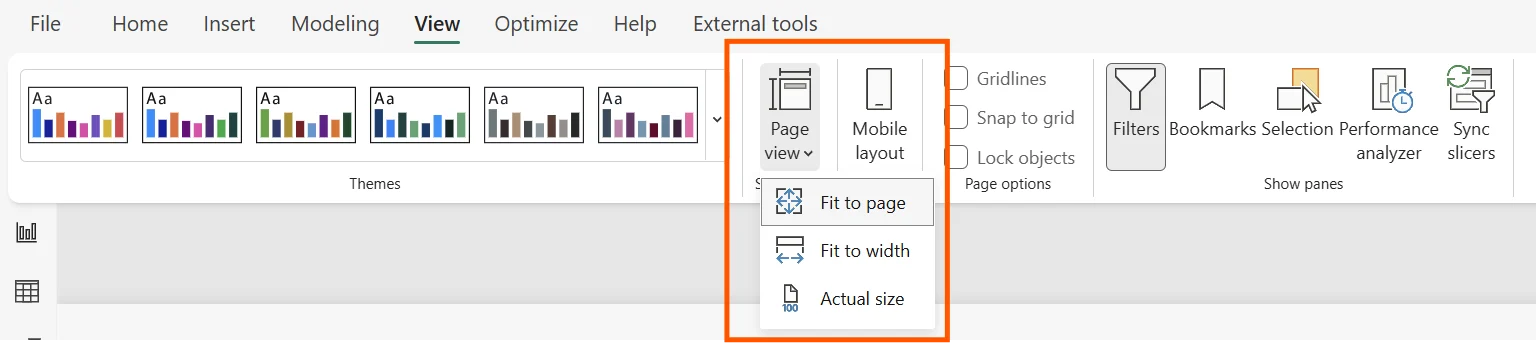
Fit to page, Fit to width, and Actual size change how the canvas is displayed in the window. They do not change the report page itself.
Canvas settings change the page
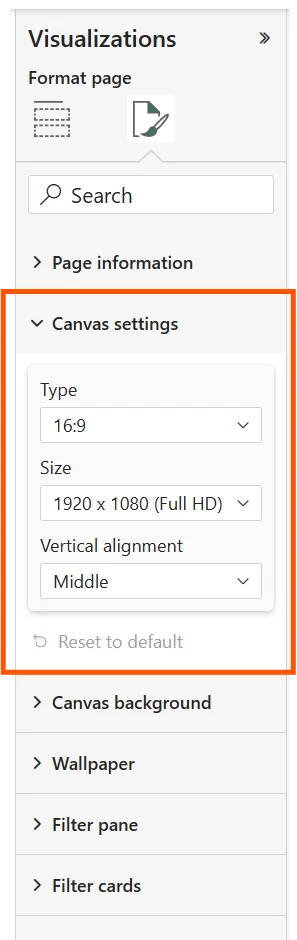
control page type, width, height, and vertical alignment. Use them when the actual report dimensions or aspect ratio must change.
Background and wallpaper are separate
belongs to the report page itself. fills the area around the page. Their formatting can therefore produce different visual effects even though both are page-level settings.
Theme defaults can influence new page styling, but changing never changes stored dimensions.
Exam clue: fit on screen = Page view; actual page dimensions = Canvas settings.
Key points
- : set page type and dimensions
- : Fit, Width, or Actual size
- Background and : page-level formatting
- Theme defaults: affect new pages, not existing sizes
Click an underlined term for a one-line explanation, or see them all in the glossary .
Exam trap
Changing never changes the page's actual canvas dimensions.
Sources · 2 Microsoft Learn pages Show ▾
Checked on October 4, 2026. Report a problem
Go deeper on Microsoft Learn
Checked against Microsoft Learn on October 4, 2026. Report a problem with this card