PL-300 · 3.1.3 · Visualize and analyze the data
Narrative visual with Copilot
Create a narrative visual with Copilot
visuals summarize selected report visuals, including supported hidden visuals, and are refined through .
Generated insight lives on the report
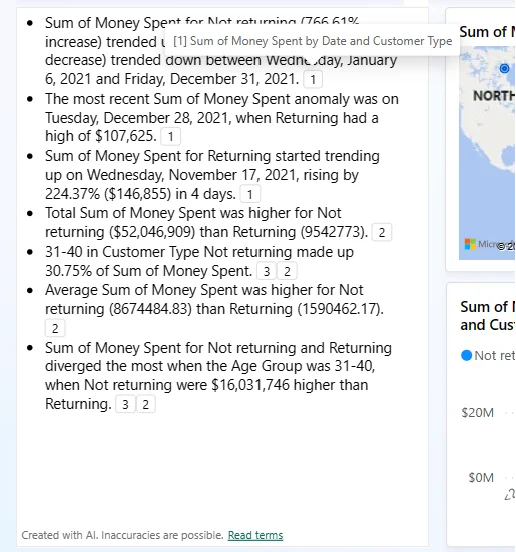
The visual writes a summary directly on the report canvas. Its scope can be the whole report, selected pages, or selected visuals.
Refine with prompts
The generated narrative is adjusted through rather than normal direct text editing. Footnotes link statements back to the visuals that support them.
After filters or data change, refresh the narrative so regenerates the text for the new report state.
Know what can be included
Supported display-only can expose visuals that are hidden by default so the narrative can include them. or bookmarks that alter data state are not equivalent.
A narrative visual summarizes report content. It is different from asking Copilot to summarize the itself.
Exam clue: generated written insight embedded as a visual = Copilot Narrative.
Key points
- Write permission: required to add the
- Scope: report, pages, selected visuals, or supported hidden visuals
- : refine generated text because direct editing is unavailable
- Footnotes: point back to visuals behind generated statements
- Refresh: regenerate after filters or data change
Click an underlined term for a one-line explanation, or see them all in the glossary .
Exam trap
Hidden visuals require reachable display-only report bookmarks, not personal or data-changing bookmarks.
Sources · 2 Microsoft Learn pages Show ▾
Checked on October 4, 2026. Report a problem
Go deeper on Microsoft Learn
Checked against Microsoft Learn on October 4, 2026. Report a problem with this card