PL-300 · 1.2.3 · Prepare the data
Resolve import errors
Resolve data import errors
Step errors stop a query; cell errors affect only individual values.
Step-level error
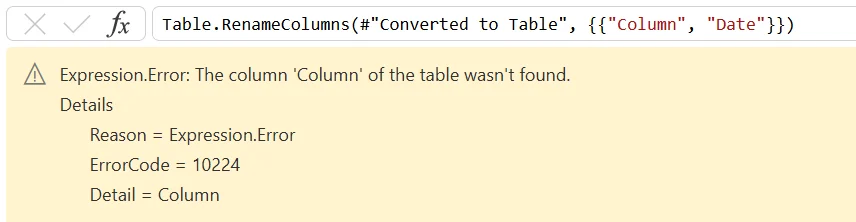
A prevents the query from completing. Broken source paths, missing columns, and privacy firewall problems are common causes. Read the reason, message, and details before changing the query.
Cell-level error
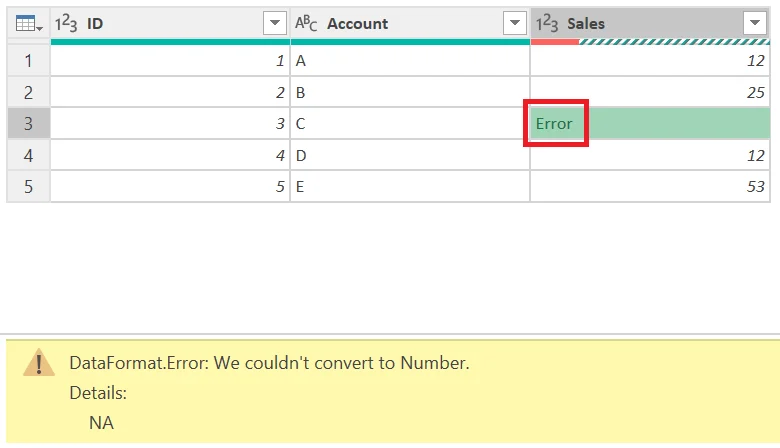
A affects individual values while the rest of the query can still load. You can remove error rows, replace errors, or keep only error rows for investigation.
Diagnose before you repair
A step error means the query pipeline cannot complete, so inspect the failing step, source path, schema, credentials, or privacy issue. A cell error means the table still exists and only certain values failed.
That difference determines whether you repair the query logic or handle individual rows.
Exam clue: whole query fails = step error. Individual cells show Error = cell error.
Key points
- Step error: blocks the entire query
- : often signals privacy conflicts
- Cell error: query can still load
- Keep errors: isolates bad rows for inspection
Click an underlined term for a one-line explanation, or see them all in the glossary .
Exam trap
Keep errors filters to error rows. It does not remove or repair them.
Sources · 1 Microsoft Learn page Show ▾
Checked on October 4, 2026. Report a problem
Go deeper on Microsoft Learn
Checked against Microsoft Learn on October 4, 2026. Report a problem with this card