PL-300 · 3.2.2 · Visualize and analyze the data
Custom report page tooltips
Create custom tooltips
show a designed page filtered to the data point under the pointer.
A tooltip can be a real report page
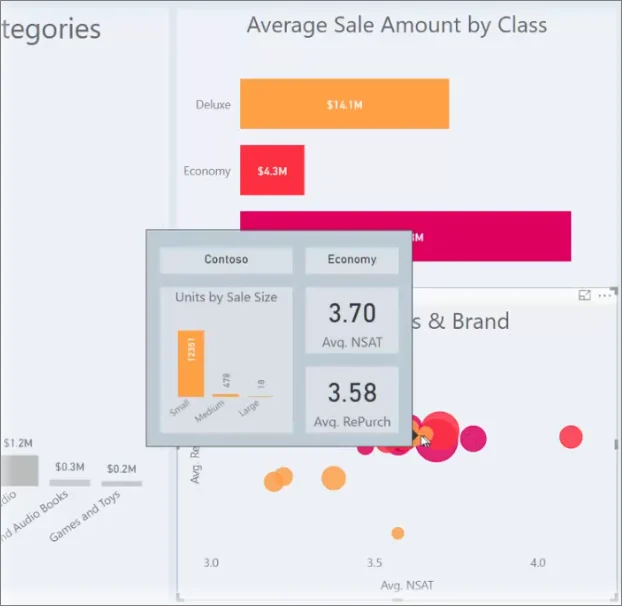
A can contain several visuals and is automatically filtered to the data point under the pointer.
Configure when it appears
Set the page size to Tooltip, enable Tooltip in Page information, and add that match the source visual. A visual can use Auto to choose the appropriate tooltip page or point explicitly to a specific tooltip page.
Tooltip or drillthrough?
A tooltip is for quick hover context. Readers cannot interact with it like a normal report page. Use when they need to click, slice, or explore the detail.
| Need | Better fit |
|---|---|
| Extra context on hover | Tooltip |
| Interactive detail page | |
| Show multiple small visuals on hover |
Exam clue: rich hover context = tooltip; interactive exploration = drillthrough.
Key points
- Tooltip page: enable Tooltip in Page Information
- : determine when the page appears
- Hover context: filters the tooltip page
- Visual setting: choose Auto or a specific tooltip page
Click an underlined term for a one-line explanation, or see them all in the glossary .
Exam trap
A tooltip page needs both Tooltip enabled and matching to appear automatically.
Sources · 1 Microsoft Learn page Show ▾
Checked on October 4, 2026. Report a problem
Go deeper on Microsoft Learn
Checked against Microsoft Learn on October 4, 2026. Report a problem with this card